


Stolen from Neogaf: http://www.neogaf.com/forum/showthread.php?t=927094
Like all homebrew and modification, INSTALL AT YOUR OWN RISK. Nintendo so far have shown they will not ban any users for hacking Wii mode on the Wii U, but it may void your warranty. This is purely a modification of the Wii Mode on Wii U and will not touch or affect anything on Wii U mode at all in any way whatsoever.
Thought this would clear up a few things.
Q: Can you play GameCube games on the Wii U?
A: Yes, you can. Through the wonders of homebrew.


Nintendont is a homebrew application for the Wii (and thusly, the Wii U via Wii mode) that takes advantage of the fact that the Wii U is backwards compatible with the Wii...which means it's also fully backwards compatible with the GameCube. Yes, that's right - the Wii U can play GameCube games natively. No emulation here.
From the official page for Nintendont:
Features:
Play audio via disc audio streaming
Full speed loading from an USB device, or a SD card
Loads 1:1 and compressed .ISO disc images
Works on Wii and vWii on Wii U
Loads games as extracted files (FST)
Memory card emulation
Bluetooth controller support (Classic Controller (Pro), Wii U Pro Controller)
HID controller support via USB
Custom button layout when using HID controllers
Cheat code support
WiiRd (only on Wii)
Changeable configuration of various settings
Reset/Power off via button combo (R + Z + Start) (R + Z + B + D-Pad Down)
Advanced video mode patching, force progressive and force 16:9 widescreen
Auto boot from loader
Disc switching
Allow use of the Nintendo GameCube Microphone
Use real memory card
Yep. That's a lot. Nintendont supports Wii U Pro Controllers, Classic Controllers, Dualshock 3, Wii Remotes and even GameCube controllers via adapters (and the upcoming official adapter will likely work too). Nintendont can also play games in widescreen, and emulate the memory card. No gamecube ports or memory card ports on the console? Who cares. Homebrew!
How to set up:
I will assume you already have the homebrew channel installed on your Wii U. If not, have a look at this guide. All you need is an SD card and Smash Bros Brawl.
Firstly, you need your gamecube games in ISO format. You can rip your collection using a homebrew'd Wii console and Cleanrip.
So, you've got the games ripped onto your USB stick or SD card. Excellent! You now have TWO GLORIOUS OPTIONS.
The 1:1 quick and easy option, or the "I have a mac" option:
When loaded directly Nintendont looks for games at:
sd:/games/<anything>/game.iso
shove your ripped isos there. one folder per game.
The compress my shit I want more space option:
You need GCIT, a windows app. Using this application, open each ISO and send it to your SD card or USB stick in a folder called GAMES on the root of the card. Select it to transfer in DiscEX format which Nintendon't can read. It's really quick to do this.
Almost there! Download the newest version of Nintendont. (always updated at this link)
Put this into your sd card in /apps/nintendont - name it boot.dol. Download metal.xml and icon.png and put those into the same folder.
now load up the Wii U, go into Wii Mode, load up the homebrew channel, select nintendont and hooray! smash bros melee, on your Wii U! Before playing anything, go into settings in Nintendont (press B), then the update menu (press X), you can download the newest software update for the app. I recommend doing this straight away.
UPDATE 1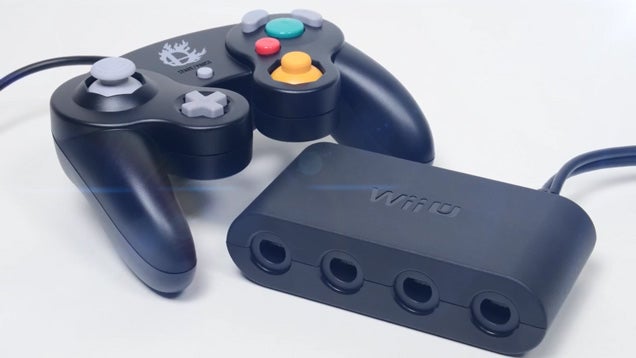
The Wii U GameCube adapter is now fully compatible with Nintendont! Now we have true backwards compatibility! It is now included in the default controller ID pack - use the update menu in Nintendont to download it. Then its a matter of enabling HID controllers in the menu, and plugging the black cable into the bottom rear port of the console. If you want rumble, plug in both cables.
List of the available options in the Nintendont menu, along with explanations:
Cheats – Turn cheats on or off.
Debugger – Turn the Debugger on or off (Not important for regular use)
Debugger Wait – (Another debug option not important for regular use)
Memcard Emulation – Turn Memory Cards on or off (If on it will emulate a memory card on your SD/USB, If off it will try and use a real Memory Card which you can use on a GC compatible Wii.)
Cheat Path – To enable use of .txt files for cheats (If you aren’t using cheats dont turn it on)
Force Widescreen – Makes Nintendont try and patch the game to support widescreen tv’s.
Force Progressive – Makes Nintendont try and patch the game to support 480p resolution.
Auto Boot – If enabled Nintendont will automatically load the last game you loaded next time you launch it, holding B will stop this.
Use HID device – Enables the use of wired usb controllers (Turn it on for PS3/PS4 controllers, Logitech F510, Mayflash USB adapters and the Wii U GC Controller Adapter.)
OSReport – Makes a report that Developers can use to fix errors.
USB – Turn it on if you are using a USB Device for your games.
Drive Read LED – Makes the Wii drive light up when reading games.
Log – Creates a log file on your SD that can be used to determine errors by the developers.
MaxPads – Set the maximum controllers enabled (Up to 4 and it should be 4 by default.)
Language – Set what language you want the game to run in (Handy for some PAL games if you want a certain language, not used normally)
Video – Set video mode (PAL/NTSC/480PAL/480NTSC/Auto) use Auto normally.
Memcard Blocks – The size of the memory card (useful when using memcard multi, using anything over 251 blocks can freeze games)
Memcard Multi – If “On” Nintendont will use one shared memcard file for all games, if “Off” it uses a single memcard file for each game, I personally recommend the single card for each game so that if a game corrupts the save it doesn’t effect the entire card.
Native Control - If set to On you can use real GameCube accessories such as the GBA-LINK and a Microphone on a Wii with GC ports, it also disables all controllers except real GameCube controllers on a Wii with GC Ports.
Recommended Settings
Here are the settings you would use to just play a GameCube game with nothing else enabled, just straight up playing a game.
Cheats – Off
Debugger – Off
Debugger Wait – Off
Memcard Emulation – On
Cheat Path – Off
Force Widescreen – Off (On if you want)
Force Progressive – Off (On if you want)
Auto Boot – Off
Use HID device – On
OSReport – Off
USB – On (Off if SD)
Drive Read LED – Off
Log – Off
MaxPads – 4
Language – Auto
Video – Auto
Memcard Blocks – 251
Memcard Multi – Off
Native Control – Off
These settings are for someone that wants a memcard for each game and they’ll be using a non-USB controller.
If you wanted to use a supported USB controller you would turn “Use HID device” to ON and plug a controller into the front USB ports on a Wii U or the top one on a Wii.
Most games will work fine with “Force Progressive” and “Force Widescreen” set to ON but it can cause issues in some games, if a game freezes and doesn’t boot turn them on or off as needed.