By using this site, you agree to our Privacy Policy and our Terms of Use. Close

Forums - Gaming - Killzone ShadowFall Multiplayer runs at only 960 x 1080 resolution

Jazz2K said:
^^ it's brilliant yes but if that means games will get blurry when moving then I prefer them to just reduce some effects or lower the resolution.


If they were to lower the resolution, then the game would be blurry all of the time.  Wouldn't you agree that a game that is blurry some of the time is better than a game that is blurry all of the time?

I would prefer jaggies on a higher resolution frame rather than AA / bluriness on a lower resolution frame.


Around the Network
DM235 said:
Jazz2K said:
^^ it's brilliant yes but if that means games will get blurry when moving then I prefer them to just reduce some effects or lower the resolution.


If they were to lower the resolution, then the game would be blurry all of the time.  Wouldn't you agree that a game that is blurry some of the time is better than a game that is blurry all of the time?

I would prefer jaggies on a higher resolution frame rather than AA / bluriness on a lower resolution frame.


You are right... In fact I have no idea how these things work. When I play games they don't appear blurry and I didn't buy either PS4 or X1... might be because my TV isn't full HD (32in). I got caught in all this mess.


J_Allard said:
Zekkyou said:
SvennoJ said:
The overall result is more pleasing than GT6's 1440x1080 upscale, at least when you walk at normal speed. This is the first time I see a full screen approach being used to make a compromise between 1080p30 and 720p60. I've been posting the worst case scenarios to figure out how they do it, but it actually looks quite nice while playing.

It's amusing he claims the criticism against Titanfall's visuals to be because it's a "MS exclusive", yet he himself only criticizes Killzone as being lathered in grease, but says Titanfall's visuals are "fine".

Hypocrisy is a beautiful thing :P

You seem confused, not sure how. This entire thread is full of discussion about how the game achieves the 1080p illusion, and how it only works when you're standing still. Because when you move, things start getting very blurry. How you tie this to Titanfall is beyond me, it doesn't have that issue.

Ok let me try to show you the diference between upscaling and blending.
I took a screenshot of KZ SF multiplayer under normal conditions (was circle strafing) with it's temporal 960x1080 upscaling method. Resampled it to 1408x792, and upscaled back to 1920x1080 using paintshop. Then cropped to match your browser's native resolution for comparison. Now if KZ is always very blurry in motion, there shouldn't be any difference with 792p upscaled correct?

Upscaling always adds blur, Blending 2 960x1080 generally delivers dot for dot display resolution.

JoeTheBro linked me this excellent 60mbps video with the blending effect:
http://killzone.dl.playstation.net/killzone/kzsf_multiplayer/KZSF_HIGHTBITRATE_H264.zip
It's not the end result, since they added motion blur to the final game and probably some cutbacks in lighting, yet all the better to see the capabilities of the blending effect. It almost looks as good as the single player. You can only really see it if you pay close attention to the outlines of foliage while he runs past them, pause it at the right time and you see the tell tale signs of the vertical lines from a previous frame.

If the computing cost is the same between 792p60 and temporal interlaced 1080p60, than the latter is preferable.


Why do I care about edited and cropped pics and changing the resolution, or a video of the unfinished game? Just post some pics of the games MP in motion. These are from GAF.


Blurry.

Even worse. Check out the stairs on the right, yuck.

Compare this, guy standing still, to this. "slight movement" according to the guy who posted it. Again, yuck. Look at how everything on the ground blurs and how the turrent ahead of him loses definition. Worst of all look at the wire on the fence to the right, LOL.

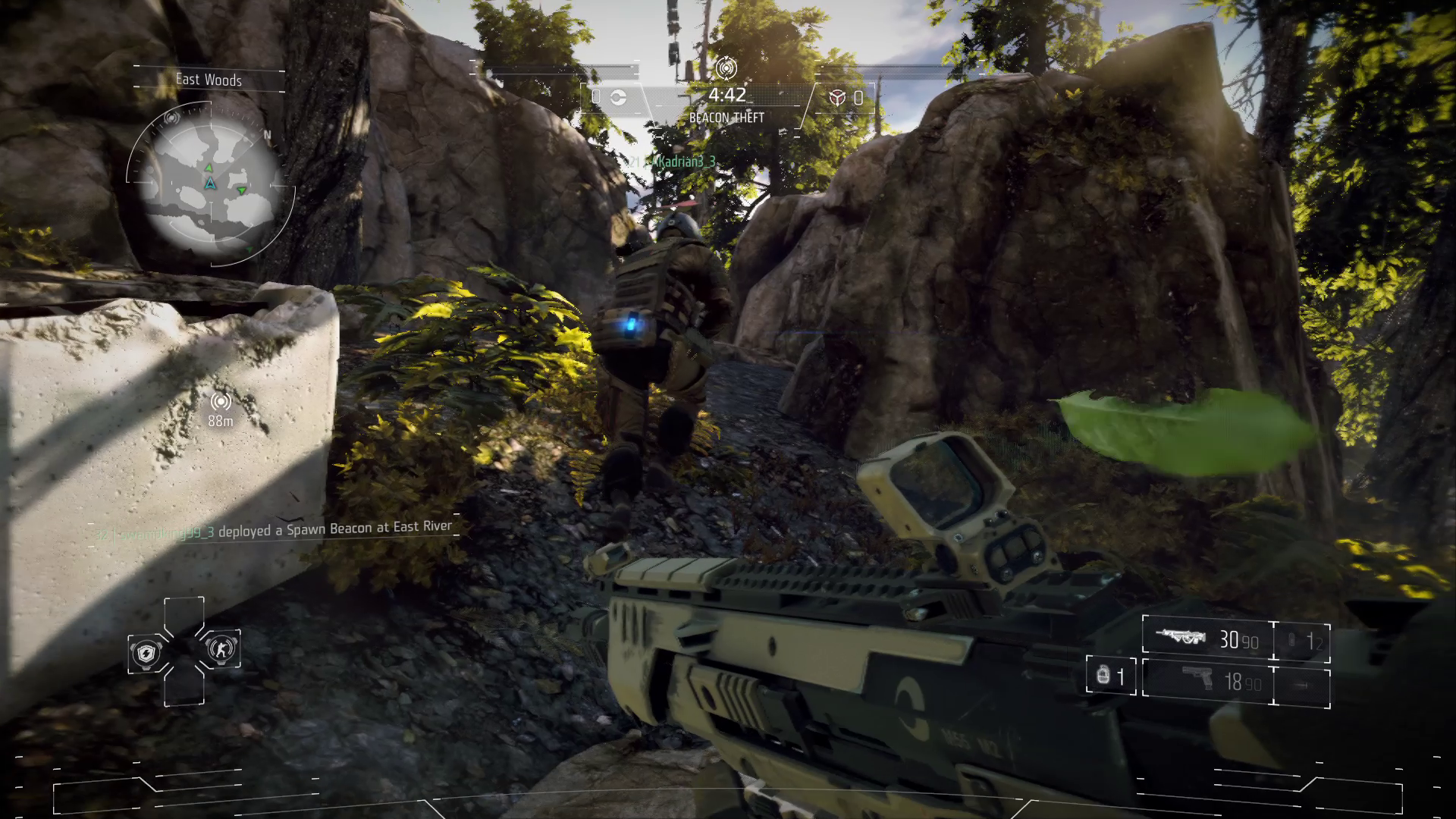
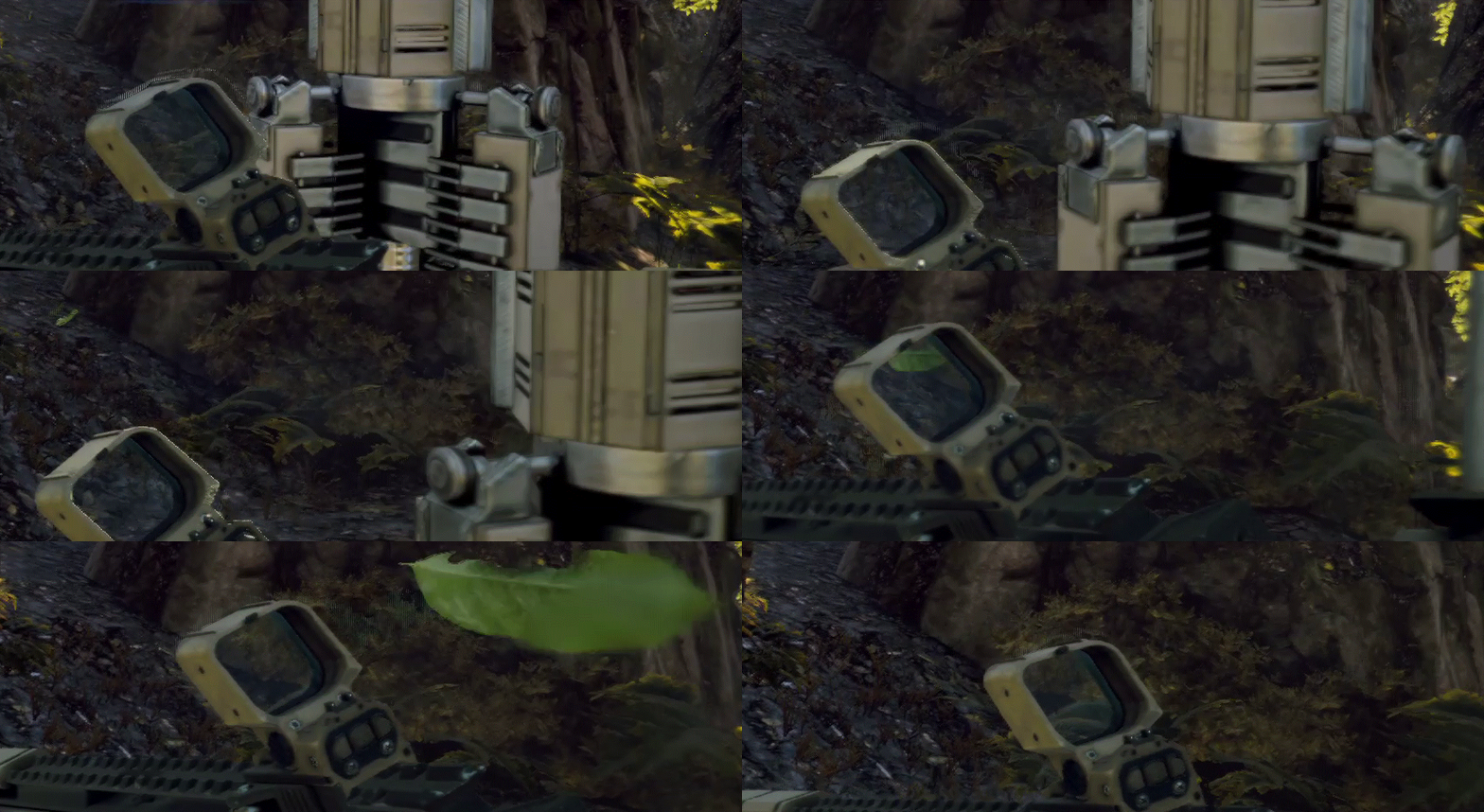
One of the best pics showcasing this imho here. Not only are the rocks all different sorts of blurry, look at the leaf. I guess it isn't wearing underpants, they had to censor the lower half of it. Check it out in .gif form and watch it blur on by!

There are plenty of other pictures in their thread if you wanna check them out. Hey I agree the game looks great in SP where this isn't an issue, and even in MP so long as you stand still. Campers must think the game is the best looking game ever. But when you start moving there is ghosting and blur and artifcacts everywhere, it's jarring. All so they could say somehow they kind of sort of hit something like 1080p. I know I said this once before but a reply drew me back in, not even gonna check this thread again, don't want to be mistaken for trolling or something.



J_Allard said:

Why do I care about edited and cropped pics and changing the resolution, or a video of the unfinished game? Just post some pics of the games MP in motion. These are from GAF.


Blurry.

Even worse. Check out the stairs on the right, yuck.

Compare this, guy standing still, to this. "slight movement" according to the guy who posted it. Again, yuck. Look at how everything on the ground blurs and how the turrent ahead of him loses definition. Worst of all look at the wire on the fence to the right, LOL.

One of the best pics showcasing this imho here. Not only are the rocks all different sorts of blurry, look at the leaf. I guess it isn't wearing underpants, they had to censor the lower half of it. Check it out in .gif form and watch it blur on by!

There are plenty of other pictures in their thread if you wanna check them out. Hey I agree the game looks great in SP where this isn't an issue, and even in MP so long as you stand still. Campers must think the game is the best looking game ever. But when you start moving there is ghosting and blur and artifcacts everywhere, it's jarring. All so they could say somehow they kind of sort of hit something like 1080p. I know I said this once before but a reply drew me back in, not even gonna check this thread again, don't want to be mistaken for trolling or something.

Well said, but blur is not always bad. Almost all games actually go in after rendering and blur fast moving objects to make it look better. In those screenshots the blur could be good or bad, but we can't tell without knowing the scene's motion. In in the gif however we can see that it's a very fast moving leaf. Ideally it'd just be a green streak across the screen. Here are two 60fps gifs. One has motion blur and the other doesn't.

Bluring does lose some image detail, but it also produces a much better sensation of movement. You might have a personal preference for the unblurred gif(top), but it's an industry standard to try and replicate the bottom.


Around the Network

^ Yes, well implemented motion blur smooths the motion, but KZ SF uses some ugly radial motion blur while sprinting. Most of those pictures J_Allard linked are from sprinting (gun pointed down) which is when the radial motion blur switches on, most evident in that half blurred leaf. That has nothing to do with temporal blending. I guess to dramatize the run effect, same way NFS blurs and zooms the screen with turbo although you hardly go any faster.

Temporal blending can give you better results, while upscaling always suffers from a base softness on a 1080p display. On the other hand, variable sharpness has the problem that you're constantly made aware of the difference. If it's always the same upscaled you get used to the softness. KZ SF basically keeps showing you the difference between the two like a side by side comparison.

I don't know what's better (1920x1080 60 obviously, but alas). I'm leaning towards anything that can hit native display res, as that simply looks better on LCD. The effect is not unlike any video you ever watch. Even blu-ray blurs with movement, screenshots from moving scenes don't look any better. With video games it's always nice that the picture stays stable during fast movements. The effect can certainly be improved, I rather have they spend the time optimizing it so it can run in full 1920x1080, and turn that awful radial motion blur off. Or offer 1920x1080 30. At least single player is not compromised.

Anyway screw resolution, Dark souls 2 will be here in 6 days.


Guys, KZ SF was a rushed launch title due to PS needing a big named exclusive in the line up. The game lacked voice chat and a clan system at launch (has it now), and I'm sure any cuts to MP res could be tied into this as well. Those saying that this is proof that the new gen is weak are fools (for either console). We all know PC will be king, but none of these games out right now for either console are %100 optimized. Most are cross gen and aside from res and frame rate, they are the same as their PS360 counterparts. Yes the tech is similar to a PC build, but we are talking about consoles that have dedicated resources and a PC with matching specs or the same price tag will never match it due to resources being split up to the OS and such (any true PC gamer knows this...as far as PS4 is concerned as X1 is overpriced). Launch titles will never be a deciding performance factor in this industry.

The real test for these consoles will be with games like Infamous, Uncharted, The Order, Halo 5, and Quantum Break. These games will set the bar for next gen visuals for these platforms. Beyond that this gen will be more like most predicted. Better AI, innovative game play mechanics, and proper story telling will be what this gen will be about because in terms of raw power, the limit will be tapped much sooner (PC gamers were right about this). However even after this, we will still see a long and healthy 8th gen because remember most of the games we have seen so far are either old engines, or modified versions of those engines. When new engines are developed the push for visuals and performance will see the bar raised yet again (difference being PC will also see an increase as well due to similar architecture).

Everyone wins, nothing has changed. PC will be for graphics enthusiasts. Consoles will be for convenience and exclusive titles. Everyone will have their tastes and preferences. Stop spelling doom and gloom on everything and enjoy the games for crying out loud. In the end, this could be very good for the console and PC industry alike.


Nintendo Switch Friend Code: SW-5643-2927-1984

Animal Crossing NH Dream Address: DA-1078-9916-3261

SvennoJ said:

Ok let me try to show you the diference between upscaling and blending.
I took a screenshot of KZ SF multiplayer under normal conditions (was circle strafing) with it's temporal 960x1080 upscaling method. Resampled it to 1408x792, and upscaled back to 1920x1080 using paintshop. Then cropped to match your browser's native resolution for comparison. Now if KZ is always very blurry in motion, there shouldn't be any difference with 792p upscaled correct?

Upscaling always adds blur, Blending 2 960x1080 generally delivers dot for dot display resolution.

JoeTheBro linked me this excellent 60mbps video with the blending effect:
http://killzone.dl.playstation.net/killzone/kzsf_multiplayer/KZSF_HIGHTBITRATE_H264.zip
It's not the end result, since they added motion blur to the final game and probably some cutbacks in lighting, yet all the better to see the capabilities of the blending effect. It almost looks as good as the single player. You can only really see it if you pay close attention to the outlines of foliage while he runs past them, pause it at the right time and you see the tell tale signs of the vertical lines from a previous frame.

If the computing cost is the same between 792p60 and temporal interlaced 1080p60, than the latter is preferable.

Thanks for the pictures, they make the situation really clear.  I would be pretty mad.


Really not sure I see any point of Consol over PC's since Kinect, Wii and other alternative ways to play have been abandoned. 

Top 50 'most fun' game list coming soon!


Tell me a funny joke!

Just realized this topic title isn't specific enough.
KZ:SF multiplayer is rendered at 1080i 60fps which is essentially 1080p 30 fps but rendering half the frame in half the time.
KZ:SF multiplayer is output at 1080p 60fps because of the interlacing. Thus the PS4 is doing no upscale, which is why the pixel density per frame is 1920x1080.
Thus the Resolution (display output) is 1080p 60 fps.

For the multiplayer: Framerate > Resolution as is the case for most fps, they increased the framerate at a tradeoff of fidelity, but not Resolution.

In fact, using this method, Titanfall could easily run 1080p 60fps locked with a minimal hit on fidelity if they do it right, but I don't know if the source engine supports interlacing.


In this day and age, with the Internet, ignorance is a choice! And they're still choosing Ignorance! - Dr. Filthy Frank

Guerrilla games have issued a statement about he process. It's a bit more involved than I thought, it actually uses 3 frames to calculate the new frame.

http://www.killzone.com/en_GB/blog/news/2014-03-06_regarding-killzone-shadow-fall-and-1080p.html

Q: So how does “temporal reprojection” work and what’s the difference with up-scaling?

Up-scaling is a spatial interpolation filter. When up-scaling an image from one resolution to another, new pixels are added by stretching the image in X/Y dimension. The values of the new pixels are picked to lie in between the current values of the pixels. This gives a bigger, but slightly blurrier picture.

Temporal reprojection is a technique that tracks the position of pixels over time and predicts where they will be in future. These “history pixels” are combined with freshly rendered pixels to form a higher-resolution new frame. This is what KILLZONE SHADOW FALL uses in multiplayer.

 So, in a bit more detail, this is what we need for this technique:
     We keep track of three images of “history pixels” sized 960x1080
        The current frame
        The past frame        
        And the past-past frame       
    For each pixel we store its color and its motion vector – i.e. the direction of the pixel on-screen    
    We also store a full 1080p, “previous frame” which we use to improve anti-aliasing

Then we have to reconstruct every odd pixel in the frame:
    We track every pixel back to the previous frame and two frames ago, by using its motion vectors    
    By looking at how this pixel moved in the past, we determine its “predictability”    
    Most pixels are very predictable, so we use reconstruction from a past frame to serve as the odd pixel    
    If the pixel is not very predictable, we pick the best value from neighbors in the current frame
    
On occasion the prediction fails and locally pixels become blurry, or thin vertical lines appear. However, most of the time the prediction works well and the image is identical to a normal 1080p image. We then increase sub-pixel anti-aliasing using our 1080p “previous frame” and motion vectors, further improving the image quality.


Cool technique, but I wonder at what point it becomes cheaper to render the whole frame.