


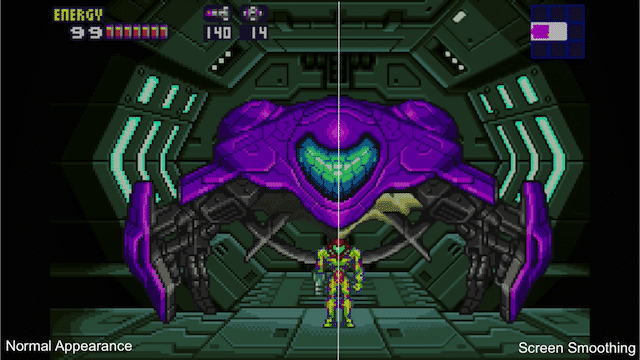
Screen Smoothing
Hidden away in the game’s Virtual Console settings menu is the option to smooth the screen. The GBA’s resolution was originally 240×160 which means it is blown up considerably when brought to the TV and the individual pixel placement is incredibly noticeable. As such, when you activate this feature, things will be smoothed.
All diagonal lines will look less blocky and curves will look curved. This makes the games a bit more pleasing to the eye and seem a bit more updated. However, this does not fit all games. For games like Metroid Fusion and Super Mario Advance 3: Yoshi’s Island, it takes the edge off and doesn’t detriment the graphics at all, but for games like WarioWare Inc., it takes away from the aesthetic, but it’s a purely subjective thing.
This option also doesn’t need you to delve into the Virtual Console menu to activate it, as you can activate it in real-time by pressing down the Right Stick.
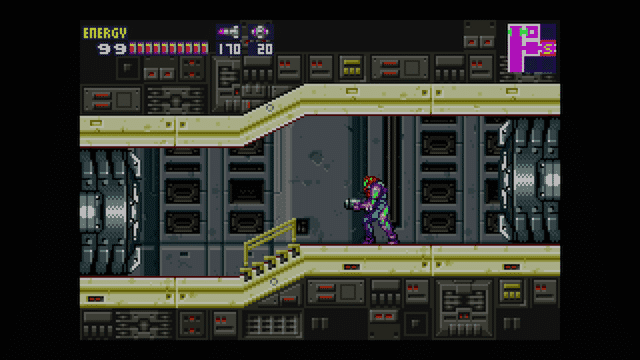
Resolution
As stated before, the original GameBoy Advance resolution is 240×160. Due to this, the upscale of the games to 1080 has a bit of an issue.
The game doesn’t take up the whole screen, but rather a block of 1620×1080 is an increase of a factor of 6.75 the size as the original. Due to this, it’s not an exact upscale of the game. While there’s no blurring issues with this, many would like to play with the original resolution.
This is possible within the Virtual Console settings menu. In it, it provides an option for Original Resolution, which runs on the TV screen. Due to the fact that would be a tiny little box on a huge screen, the Virtual Console runs it a different way. Instead, it upscales it to the largest whole factor it can on the screen: 1440×960 making it 6×6 pixels for every 1 original pixel.
This doesn’t affect the resolution on the GamePad, and it isn’t possible to run a toggle in real time for this.
Gamma Reduction
One thing of which many people may not be aware is that with the early releases of the GBA titles on that platform games were artificially brightened in order to compensate for the handheld’s screen which, before the release of the GBA SP, had no lighting whatsoever. The Wii U’s Virtual Console releases of these titles have them all altered in order to compensate for this over brightening.
While many may be angered by this, if your TV is set up properly, you won’t notice that this is even in place, but with the GamePad, it will seem noticeably darker.

Manual
When the trailers for the GBA titles came on the official Japanese site last week, many people noticed a small ? icon on the GamePad screen, to the side of the gameplay. Many questioned what this was, and now we know.
If you touch that icon, you can bring up the game’s manual onto the GamePad. Unlike previous Wii U manuals, however, these are full detailed scans of the original manual for the GBA game. You have the ability to scroll through the pages using the touchscreen on the GamePad and allow you to zoom if you do so wish.
But, that’s not all. Not only can you look at it on the GamePad, you can have it running on the GamePad, and navigate around it, while still playing the game on the TV screen.
http://www.nintendo-insider.com/2014/04/02/smoothing-resolution-manuals-guide-gba-virtual-console/
 Currently Online