By using this site, you agree to our Privacy Policy and our Terms of Use. Close

Forums - Microsoft - How do I get sound to my X360?

Ok, I have this one. How can i utilize this? its the only sound source I have except for headphones.

http://www.logitech.com/en-gb/speakers_audio/home_pc_speakers/devices/236

Would those RCA cables be a waste? Since i dont think this speaker can accept RCA cables.


Around the Network

First of all, DON'T BUY the ridiculously overpriced original Microsoft cable, the cheap clones are usually just as good and they are like one tenth the price.
In the beginning I used such a cable for my 360 as well and it works okay. You will probably need an additional Cinch stereo jack adapter though if you don't have one already.

But you will not get the best possible picture quality when you're using that VGA cable. Since your monitor has a DVI port, you would get the best picture quality by connecting the 360 HDMI output to the DVI input of your monitor.


Slimebeast said:
Ok, I have this one. How can i utilize this? its the only sound source I have except for headphones.

http://www.logitech.com/en-gb/speakers_audio/home_pc_speakers/devices/236

Would those RCA cables be a waste? Since i dont think this speaker can accept RCA cables.

The MS VGA cable comes with this adapter:

Plug it into your sound system or your PC.


Barozi said:
Slimebeast said:
Ok, I have this one. How can i utilize this? its the only sound source I have except for headphones.

http://www.logitech.com/en-gb/speakers_audio/home_pc_speakers/devices/236

Would those RCA cables be a waste? Since i dont think this speaker can accept RCA cables.

The MS VGA cable comes with this adapter:

Plug it into your sound system or your PC.

Cool. Then everything works. But the guy above me now says that VGI picture quality sux and I should connect to the DVI port on the monitor instead.

EDIT: no, it still wouldnt work because look, my speakers look like this:


I think the best solution for your problem is to buy a HDMI to DVI cable, witch you could also use on your PS3.

The sound problem is easily solved, but requires a little trick, since you can get the image from the HDMI cable, and the sound from te AV connection with your old Component cable.(you can connect two cables at the same time).

The thing is that Microsoft put the HDMI out connection close to the AV cable connection on purpose, so that you think you have to buy their $50 cable that you can only use on their system.

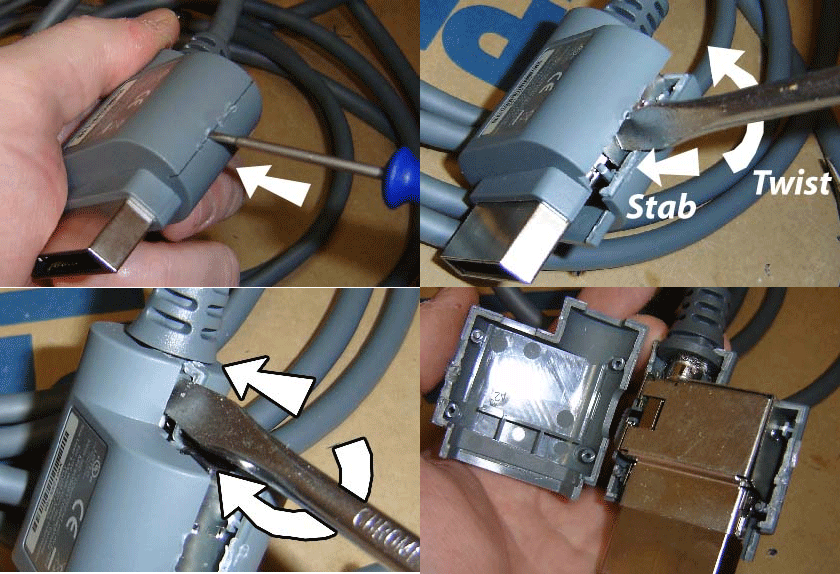
Now the trick: Take your old component cable and carefully remove te lower side of the plastic casing around te connection. This leaves a flat metal surface, witch takes up less space. Now it fits perfectly with any HDMI cable! I use this solution to and it's great.


Around the Network
Slimebeast said:
Barozi said:
Slimebeast said:
Ok, I have this one. How can i utilize this? its the only sound source I have except for headphones.

http://www.logitech.com/en-gb/speakers_audio/home_pc_speakers/devices/236

Would those RCA cables be a waste? Since i dont think this speaker can accept RCA cables.

The MS VGA cable comes with this adapter:

Plug it into your sound system or your PC.

Cool. Then everything works. But the guy above me now says that VGI picture quality sux and I should connect to the DVI port on the monitor instead.

Personally I don't see a big difference between VGA and DVI. At least not without a direct comparison picture.

I guess it would work if you buy a HDMI/DVI adapter (in case your 360 "already" supports HDMI) and then use the standard component cables (the ones that came with your 360) and get the above quoted adapter as well.

Didn't try that, but I guess this would work too.


Forced EDIT:

plug it into your PC just like disolitude mentioned it in his very first post.


'nother edit: disolitude beat me to it....


Here is a picture how to do the trick i described above:

It;s the cheapest solution, you get to re-use your old cable. :P Check here for a guide: http://www.chadledford.com/?p=50 

Again don't buy the official Microsoft HDMI cable, it's a rip-off.


Slimebeast said:
Barozi said:
Slimebeast said:
Ok, I have this one. How can i utilize this? its the only sound source I have except for headphones.

http://www.logitech.com/en-gb/speakers_audio/home_pc_speakers/devices/236

Would those RCA cables be a waste? Since i dont think this speaker can accept RCA cables.

The MS VGA cable comes with this adapter:

Plug it into your sound system or your PC.

Cool. Then everything works. But the guy above me now says that VGI picture quality sux and I should connect to the DVI port on the monitor instead.

EDIT: no, it still wouldnt work because look, my speakers look like this:

Oh for petes sake...don't make things more complicated here.

Don't listen to people saying VGA picture sucks. It doesn't suck. Its the same shit as HDMi considering 360 doesn't do 1080p and upscales everything and the fact that you are gaming on a 24 inch monitor. If you were playing on a 60 inch LED screen...then yeah, you'd notice the difference.

Also, yeah your speakers won't plug in to the adapter and you either need to plug the xbox (with the adapte included) in to your PC's line in jack or you need to buy the adapter I listed above which will give you an audio jack out of RCA cables.


You do not need the VGA cable to have both the HDMI and AV cables connected.  All you need to do is take off the bulky plastic housing from the AV cable using a knife.  It takes all of 30 seconds and does not damage the internals of the cable connector in any way.  Once that is done, the AV cable connector will be slim enough that booth it and an HDMI cable will fit.  After that use the RCA red white cable with a cheap adapter to mini stereo for audio and HDMI to DVI for video.


Slimebeast, before you do anything, don't buy that 360 VGA adapter for $50. I know a guy who sells it for $20 brand new. I bought a sealed official 360 VGA adapter for just $20 from him.

http://store.richspsxparts.com/newxb360vgac.html

I don't know if this is the cheapest you'll find it for but all I know is, I got an official MS VGA adapter for just $20 brand new.

You also may need to buy an extra audio adapter (it's cheap though) if your speakers can't take red and white AV cables natively.

If you want a solution for a PS3 too, you are SOL. HDMI will work with both consoles but your monitor doesn't have HDMI. Anyone know if the PS3 supports VGA? If so, maybe there's a VGA adapter you can use with the PS3.


Oh and as mentioned on here before, I don't think DVI or HDMI is really an upgrade from VGA if you are using a 24" monitor. Once you go from SDTV to VGA (especially at 24"), you will notice a big jump in quality. And in-game text won't be eye raping you anymore (I have nightmares thinking about Tropico 3 on a SDTV. Good lord. Worst SDTV text evar!) But VGA to DVI or even HDMI at 24"? I doubt it.