By using this site, you agree to our Privacy Policy and our Terms of Use. Close

Forums - Microsoft - Windows 10 won't let you delay or prevent Windows automatic updates from installing.

MohammadBadir said:
Captain_Yuri said:

I would assume it will be like in windows 8.1 where it will only apply the update when u are shutting down or restarting and be able to delay the update by a few days for the pro users otherwise this really will be nonsense

Oh. I don't have Pro :/

Dw, u should be able to delay it until you restart or shutdown the system in the non-pro version i believe


PC Specs: CPU: 7800X3D || GPU: Strix 4090 || RAM: 32GB DDR5 6000 || Main SSD: WD 2TB SN850

Around the Network

By you can delay the reboot, do they mean the reoccurring 15 minute nagging to reboot now or later, and if you miss it once, tough luck. I have lost work too that way, and have come back to an empty desktop the next morning. (I usually have tons of browser windows open, folders, image programs etc.) Automatic updates are turned off. (Of course now when I decide to reboot it takes forever to get through the backlog of updates :/)

I'll wait, there are bound to be a lot of updates in the beginning. Hopefully at the end of the free upgrade year it will have settled down a bit.


SvennoJ said:
By you can delay the reboot, do they mean the reoccurring 15 minute nagging to reboot now or later, and if you miss it once, tough luck. I have lost work too that way, and have come back to an empty desktop the next morning. (I usually have tons of browser windows open, folders, image programs etc.) Automatic updates are turned off. (Of course now when I decide to reboot it takes forever to get through the backlog of updates :/)

I'll wait, there are bound to be a lot of updates in the beginning. Hopefully at the end of the free upgrade year it will have settled down a bit.

You can schedule reboots..  As of right now Windows 10 picks a time that it knows you arent usually on your computer.. (Mine sets itself for 3AM)..  


XBLive: cpg716     PSN ID: cpg716  Steam: Luv4Tech77

Predictions on 12/01/15 - Generation 8 Totals:

PS4: 85-95m
X1: 55-65m
WiiU: 20-30m

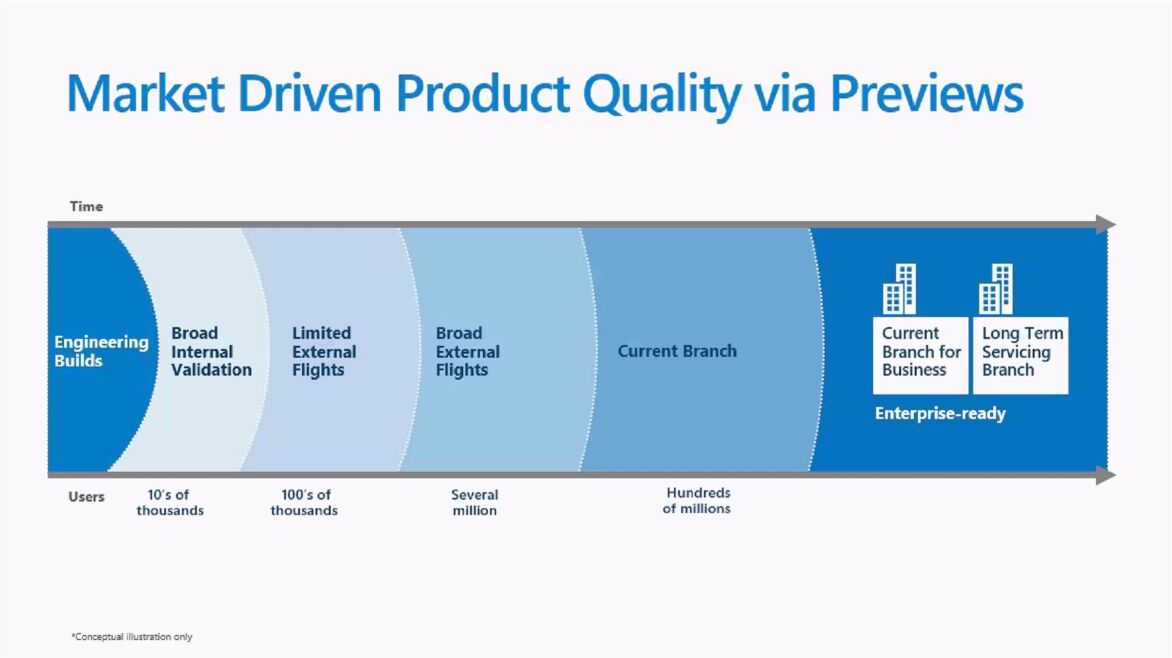
By the way, at the point when Windows 10 updates are released in the "current branch" (that includes Windows 10 Home users), they already have been tested in other branches by several million users:

Problems caused by Windows updates which can't be filtered out early enough for the "normal users" are much less likely than with the update systems of older Windows versions (or firmware updates on consoles which can also cause problems).


And I just found out the DS4 isn't going to work with all games on W10.. http://www.neogaf.com/forum/showthread.php?t=1081643

Cancelling my upgrade


Around the Network

No biggie since MS already has a solution for it.


Hiku said:
Conina said:

By the way, at the point when Windows 10 updates are released in the "current branch" (that includes Windows 10 Home users), they already have been tested in other branches by several million users:

-Snip image-

Problems caused by Windows updates which can't be filtered out early enough for the "normal users" are much less likely than with the update systems of older Windows versions (or firmware updates on consoles which can also cause problems).

Can I get a link to where it says that every Windows 10 update intalled will fall under the "current branch" category?
Also, under which category did the Win 7 updates fall under? Because there have been Windows 7 updates that bricked PC's as late as last year.

They didn't have the branch system in older Windows versions, it's a new concept. But if you couldn't google that information yourself, you probably will fare better with auto-updates instead of deciding yourself. ;)

The "external flights" in the "Windows Insider Branch" are virtually the beta testers of the updates... similar to the "Preview program" on Xbox One. They get new updates and features sooner than the rest, but the chance of problems is of course also higher. Nobody is forcing normal users in these preview programs, it's only for the interested.

But here you go: http://www.windows10update.com/windows-10-service-branches/


That sucks. Maybe I'll wait to upgrade.



NNID: FrequentFlyer54

Another good reason for me to not upgrade from Windows 7.


Wow, who gives a damn, If you really want to you will easily find a command to use in the Powershell to prevent it.  It is not difficult at all.  Quit finding nitpicky things to bash MS.   So many on this site do nothing but hate on MS.  Its very annoying, get over it.