By using this site, you agree to our Privacy Policy and our Terms of Use. Close

Forums - PC - Carzy Zarx’s PC Gaming Emporium - Catch Up on All the Latest PC Gaming Related News

Pemalite said:
JEMC said:

Trust me, you'll notice the upgrade from the very same moment you turn on your PC.

That said, I remember that your PC is a bit old, and I don't know if your motherboard will have an SATA 3 port to fully notice the extra speed of an SSD.

He will still notice a difference despite running a Nahelem/Westmere based CPU.
Boards of that era typically ran with Sata 2, which topped out at 300MB/s. Higher-end boards though sometimes came with Sata 3 at 600MB/s.

A mechanical disk isn't going to max either interface out except for some specific burst scenario's. (I.E. Reading data directly from a mechanical disks Ram.) Most mechanical disks will top out at 150MB/s. Sometimes even less.

An SSD will still provide a substantual improvement... And the low access times will make everything stupidly snappy and responsive.

I know, it's just that the difference won't be as big as it could be.

On the plus side, he wouldn't need to look for the best SSD out there and could simply look for the one with the best GB/price ratio.


Please excuse my bad English.

Former gaming PC: i5-4670k@stock (for now), 16Gb RAM 1600 MHz and a GTX 1070

Current gaming PC: R5-7600, 32GB RAM 6000MT/s (CL30) and a RX 9060XT 16GB

Steam / Live / NNID : jonxiquet    Add me if you want, but I'm a single player gamer.

Around the Network
Ka-pi96 said:
JEMC said:

Trust me, you'll notice the upgrade from the very same moment you turn on your PC.

That said, I remember that your PC is a bit old, and I don't know if your motherboard will have an SATA 3 port to fully notice the extra speed of an SSD.

I don't even know what a SATA 3 port is

If I were to go for an SSD is there any different between internal and external ones? Would they both provide the same boost? I guess an external one would just be a USB connection or something right? What about an internal, are they hard to fit? Never replaced a hard drive before, but considering how long it took me to figure out how to take the graphics card out I doubt it would be easy for me

Well, you would need an internal one because the USB connection from the externals won't be fast enough.

And in your case, I don't know if you would want to do it because it's more complex than replacing a GPU. You'd need to make what's called a mirror of your current HDD to the SSD (basically a copy of everything from the OS to all your files in a way that your computer won't notice that it's something new) or simply put the SSD in and install everything from the ground.

So yeah, it's easier said than done.

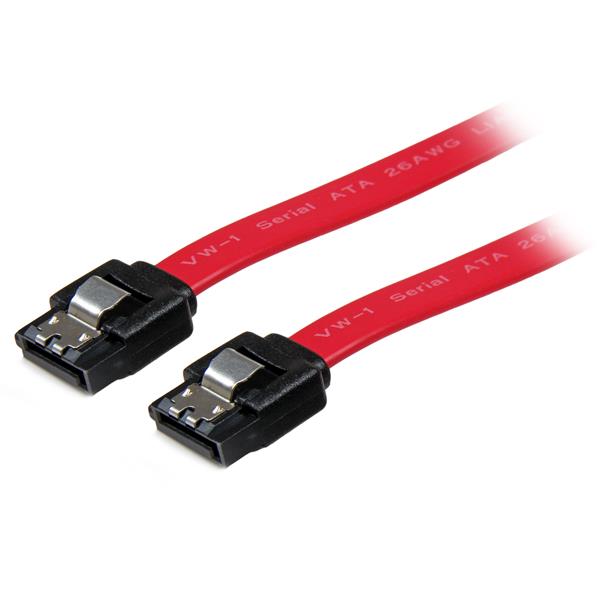
Oh, and SATA is the interface used to connect HDDs, SSD or even optical drives to your motherboard. It has had several revisions and the last one, which is the one that offers higher speeds is SATA 3. I'm sure you saw them in your PC when you changed your GPU, the cables (which can be of several colours) look like this:


Please excuse my bad English.

Former gaming PC: i5-4670k@stock (for now), 16Gb RAM 1600 MHz and a GTX 1070

Current gaming PC: R5-7600, 32GB RAM 6000MT/s (CL30) and a RX 9060XT 16GB

Steam / Live / NNID : jonxiquet    Add me if you want, but I'm a single player gamer.

Ka-pi96 said:
JEMC said:

Well, you would need an internal one because the USB connection from the externals won't be fast enough.

And in your case, I don't know if you would want to do it because it's more complex than replacing a GPU. You'd need to make what's called a mirror of your current HDD to the SSD (basically a copy of everything from the OS to all your files in a way that your computer won't notice that it's something new) or simply put the SSD in and install everything from the ground.

So yeah, it's easier said than done.

Oh, and SATA is the interface used to connect HDDs, SSD or even optical drives to your motherboard. It has had several revisions and the last one, which is the one that offers higher speeds is SATA 3. I'm sure you saw them in your PC when you changed your GPU, the cables (which can be of several colours) look like this:

*pic*

Well that makes things more complicated.

My PC has two 500GB HDDs though. I assume I wouldn't need to mirror anything if I replace the 2nd one rather than the one that my OS is on right?

If you want to make your PC faster, you'll need to use the SSD as you main drive, which means having the OS and main programs installed on it.

But you can leave it as it is and install your games to the SSD to make loading times faster. OS and other progams won't benefit from it, but it will also be easier to do.


Please excuse my bad English.

Former gaming PC: i5-4670k@stock (for now), 16Gb RAM 1600 MHz and a GTX 1070

Current gaming PC: R5-7600, 32GB RAM 6000MT/s (CL30) and a RX 9060XT 16GB

Steam / Live / NNID : jonxiquet    Add me if you want, but I'm a single player gamer.

Ka-pi96 said:
JEMC said:

If you want to make your PC faster, you'll need to use the SSD as you main drive, which means having the OS and main programs installed on it.

But you can leave it as it is and install your games to the SSD to make loading times faster. OS and other progams won't benefit from it, but it will also be easier to do.

Would having the OS on an SSD or not make any difference to games? The boot up time doesn't bother me in the slightest, so if that doesn't improve game load times then it would just be a waste of space for me, and an extra hassle with all the cloning stuff.

If I can replace my 2nd HDD with an SSD and just put a few games on there and enjoy all the benefits then that would definitely be worthwhile.

No, for games there won't be much of a difference because of that.

You can get an SSD only for your games to enjoy the faster loading times.


Please excuse my bad English.

Former gaming PC: i5-4670k@stock (for now), 16Gb RAM 1600 MHz and a GTX 1070

Current gaming PC: R5-7600, 32GB RAM 6000MT/s (CL30) and a RX 9060XT 16GB

Steam / Live / NNID : jonxiquet    Add me if you want, but I'm a single player gamer.

Slay the spire really needs some more content. So far it's only two classes. And the only extended mode is just a mode that makes things even harder, as if it isn't challenging enough. Can't wait for the 3rd class very soon :)


If you demand respect or gratitude for your volunteer work, you're doing volunteering wrong.

Around the Network
Ka-pi96 said:
JEMC said:

If you want to make your PC faster, you'll need to use the SSD as you main drive, which means having the OS and main programs installed on it.

But you can leave it as it is and install your games to the SSD to make loading times faster. OS and other progams won't benefit from it, but it will also be easier to do.

Would having the OS on an SSD or not make any difference to games? The boot up time doesn't bother me in the slightest, so if that doesn't improve game load times then it would just be a waste of space for me, and an extra hassle with all the cloning stuff.

If I can replace my 2nd HDD with an SSD and just put a few games on there and enjoy all the benefits then that would definitely be worthwhile.

You might see a slight advantage in more demanding games.
With only 6GB of Ram you would probably find such games paging to disk fairly often once they use up all your working Ram.
In such an instance, SSD's provide a boost.

Things like Alt-Tab, Steam, Browsers and so on will all see marked improvements. But unless you have the game installed on your drive, load times will not improve by much.

I am of the mind that someone would have to pay me to use a PC with a mechanical disk as the OS drive, I was on the SSD bandwagon back in the OCZ Vertex 2 days (2010~ era) and haven't look back. :)
And it's probably the single best upgrade to bring an older PC back to life. (One reason why I haven't thrown out the old Core 2 machine yet.)

Failing that... There is actually an alternative.... Like the Sandisk Readycache. They come in 32GB variety's and they will cache your most used data, they work in conjunction with your mechanical drives.
I have one in my grandmothers machine, you actually get used to it and think it's not working... Until you clear the cache or remove the drive and you get a bloody good reminder of how terrible a mechanical disk truly is. Haha


www.youtube.com/@Pemalite

Well shit, no wonder my benchmark was giving me frame hiccups:


Built from the ground up my ass. Not even the benchmark was done that well if we're seeing shit like this. 


Mankind, in its arrogance and self-delusion, must believe they are the mirrors to God in both their image and their power. If something shatters that mirror, then it must be totally destroyed.

Ka-pi96 said:

Is that if I had the OS on an SSD, or the game? I really don't care about the alt-tab, Steam etc stuff, if the game loads faster on an SSD without the OS being on it then that's all I need (and would save a lot of hassle/money for a larger SSD)

Just the OS on the SSD. Virtual Memory is usually on the same drive as the OS... And when a game starts demanding more memory than you have in Ram, it starts using Virtual memory instead.
Of course your mileage may vary depending on how memory intensive a game is and how reliant they are on the swap file.
But I have seen some games pass 8GB of ram used on my system.. Once saw Battlefield 1 consume 15GB.

But because you don't really have much of a concern for system responsiveness, you might just be better off finding a cheap 16GB kit of fast, low-latency DDR3 Ram, it may help boost your CPU performance too.


www.youtube.com/@Pemalite

vivster said:
Slay the spire really needs some more content. So far it's only two classes. And the only extended mode is just a mode that makes things even harder, as if it isn't challenging enough. Can't wait for the 3rd class very soon :)

Give them time. It's an Early Access title after all.

Chazore said:

Well shit, no wonder my benchmark was giving me frame hiccups:

*snip*

Built from the ground up my ass. Not even the benchmark was done that well if we're seeing shit like this. 

Well, S-E has always shown the game running on Nvidia machines, even before the port was announced, so of course it had to be using GameWorks.

I'm so glad I don't care about FF XV.

Pemalite said:
Ka-pi96 said:

Is that if I had the OS on an SSD, or the game? I really don't care about the alt-tab, Steam etc stuff, if the game loads faster on an SSD without the OS being on it then that's all I need (and would save a lot of hassle/money for a larger SSD)

Just the OS on the SSD. Virtual Memory is usually on the same drive as the OS... And when a game starts demanding more memory than you have in Ram, it starts using Virtual memory instead.
Of course your mileage may vary depending on how memory intensive a game is and how reliant they are on the swap file.
But I have seen some games pass 8GB of ram used on my system.. Once saw Battlefield 1 consume 15GB.

But because you don't really have much of a concern for system responsiveness, you might just be better off finding a cheap 16GB kit of fast, low-latency DDR3 Ram, it may help boost your CPU performance too.

He just upgraded his GPU and is only thinking about getting an SSD because we told him that such upgrade would improve his gaming experience. If we start asking him to change even more parts, he would end spending a lot more in what would basically be a new PC.


Please excuse my bad English.

Former gaming PC: i5-4670k@stock (for now), 16Gb RAM 1600 MHz and a GTX 1070

Current gaming PC: R5-7600, 32GB RAM 6000MT/s (CL30) and a RX 9060XT 16GB

Steam / Live / NNID : jonxiquet    Add me if you want, but I'm a single player gamer.

JEMC said:
vivster said:
Slay the spire really needs some more content. So far it's only two classes. And the only extended mode is just a mode that makes things even harder, as if it isn't challenging enough. Can't wait for the 3rd class very soon :)

Give them time. It's an Early Access title after all.

Chazore said:

Well shit, no wonder my benchmark was giving me frame hiccups:

*snip*

Built from the ground up my ass. Not even the benchmark was done that well if we're seeing shit like this. 

Well, S-E has always shown the game running on Nvidia machines, even before the port was announced, so of course it had to be using GameWorks.

I'm so glad I don't care about FF XV.

Pemalite said:

Just the OS on the SSD. Virtual Memory is usually on the same drive as the OS... And when a game starts demanding more memory than you have in Ram, it starts using Virtual memory instead.
Of course your mileage may vary depending on how memory intensive a game is and how reliant they are on the swap file.
But I have seen some games pass 8GB of ram used on my system.. Once saw Battlefield 1 consume 15GB.

But because you don't really have much of a concern for system responsiveness, you might just be better off finding a cheap 16GB kit of fast, low-latency DDR3 Ram, it may help boost your CPU performance too.

He just upgraded his GPU and is only thinking about getting an SSD because we told him that such upgrade would improve his gaming experience. If we start asking him to change even more parts, he would end spending a lot more in what would basically be a new PC.

An SSD is a pretty solid investment though.
Great sequentials, godly randoms, low power draw and no moving parts.