Marks on 04 October 2012
900p at 45fps







Which one you prefer? | |||
| 1080p 30fps | 95 | 28.36% | |
| 720p 60fps | 223 | 66.57% | |
| WTF is a fps? | 14 | 4.18% | |
| Total: | 332 | ||



900p at 45fps







| Marks said: 900p at 45fps |
We have a winner, that's probably what's going to happen. Sub 1080p, dropping frames and/or screen tearing.





TheShape31 said:
Edge flicker and other artifacting can still happen. If there was no benefit, then PC games wouldn't have an option for 4xAA on native 1080p games. It's beneficial for everyone, and especially for people like myself that see aliasing easily. |
AA is needed in PC because there is no standard resolution... people have more than 20 possible screen resolutions... in TVs there is only SD, HD, FULL HD and 4K... in a game build in 1080p displayed in a 1080p screen, no need for AA, downscaled to 720p or SD could be necessary and upscaled for 4K also could need AA, mind the upscale method... why would we need extra effects to display a image in its native resolution? just more post processing power to make the image in its native res. better? AA would do nothing because there is nothing to do... no midle pixels to be filled with midle colors...
|
|
Proudest Platinums - BF: Bad Company, Killzone 2 , Battlefield 3 and GTA4


sergiodaly said:
AA is needed in PC because there is no standard resolution... people have more than 20 possible screen resolutions... in TVs there is only SD, HD, FULL HD and 4K... in a game build in 1080p displayed in a 1080p screen, no need for AA, downscaled to 720p or SD could be necessary and upscaled for 4K also could need AA, mind the upscale method... why would we need extra effects to display a image in its native resolution? just more post processing power to make the image in its native res. better? AA would do nothing because there is nothing to do... no midle pixels to be filled with midle colors... |
You still need AA in native res, play fsx in your monitors resolution without any AA and you'll see. 3D games don't have a native res, their artwork gets scaled all the time. Supersampling is the best way to get natural results, but too expensive to go beyond 2xfsaa.
Maybe we'll get some games rendered in 2560x1440 internally, downscaled to 720p to get 2xfsaa. Baldur's gate Dark alliance already used that method on ps2.



| sergiodaly said:
AA is needed in PC because there is no standard resolution... people have more than 20 possible screen resolutions... in TVs there is only SD, HD, FULL HD and 4K... in a game build in 1080p displayed in a 1080p screen, no need for AA, downscaled to 720p or SD could be necessary and upscaled for 4K also could need AA, mind the upscale method... why would we need extra effects to display a image in its native resolution? just more post processing power to make the image in its native res. better? AA would do nothing because there is nothing to do... no midle pixels to be filled with midle colors... |
I think you may have a bit of a missconception as too what AA actually does.
Antialiasing essentially is just blurring edges to make them appear smooth.
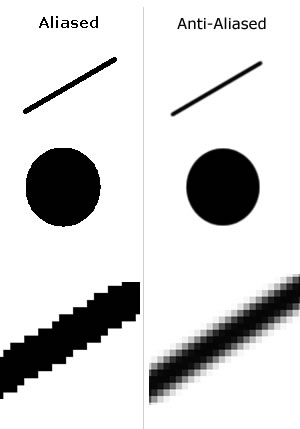
It works not matter the resolution by blending the colour of pixels along the edge. It doesn't matter if the output is the native resolution of the pannel. And most modern console games do use some form of AA these days.
On PC you can change the redering resolution of the game (well most of the time) to match the native resolution of the display. It's console games which don't render at the native resolution of the display, today most games are rendered at 720p with some bellow that and a very few above and are then scaled to mostly 1080p displays. And also down scalling a high resolution image to a lower resolution output resolution is used as a form of AA.

 @TheVoxelman on twitter







60FPS is always a sight to behold and is in many ways more eye pleasing than 1080p res... at 30FPS I mean.






My TV has a 120hz refresh rate... kills my brain sometimes. I'm not sure how much more I can take... lol
Ask stefl1504 for a sig, even if you don't need one.





Actually, probably none of the options will happen. PS3 and X360 are completely capable to display games in 1080p and 60 fps. What happens in reality is that the developers sacrifice the framerate and resolution to be able to use more effects, AA, objects in scene, etc.
Uncharted in 1080p/60fps wouldn't look nowhere as good as it actualy looks in sub-HD/30fps. And the average joe has a lot of difficulty to differentiate if a game is 1080p or 720p or if it is 60 fps or 30 fps. Normal people don't even know what these two things mean.
Developers will always sacrifice these two things to make a game looks better. It doesn't matter how powerfull next-gen consoles are, a game in lower resolution with a worse framerate looks can looks way better.


| JazzB1987 said: Why not 960p at 45fps? I mean why do all games have 30fps or 60 fps? |
Because of limitations of how tvs work. Tvs only accept 24hz and 60hz signals.
(120hz and 240hz tvs add in between frames, they do not accept native 120hz or 240hz signals, nor does HMDI support those frequencies)
24hz is for movies, 60hz for everything else. If you don't want awful screen tearing or inconsistent motion (judder), games only have the option to run at 60fps, 30fps, 20fps, 15fps, 12fps (60 divided by a whole number)
If you want 45fps, you need a pulldown patern like A,B,C,C, D,E,F,F, repeat every 3rd frame twice. That's not going to help since you still need to produce the first 3 frames in 1/60th of a second, then get a little break before the 4th frame. (Or store the frames ahead of time, which will create input lag)
With HMDI 1.4b (not finalized yet) you should be able to send a 120hz signal to the display, which you can divide by 3 to get to 40fps.
It would be nice if we can get rid of the fixed hz requirement for displays. It's all digital now, it would make more sense for a display to wait for a frame instead of updating at a fixed refresh rate. The times of an actual electron beam scanning a crt tube are long gone.

About Us |
Terms of Use |
Privacy Policy |
Advertise |
Staff |
Contact
Display As Desktop
Display As Mobile
© 2006-2026 VGChartz Ltd. All rights reserved.