By using this site, you agree to our Privacy Policy and our Terms of Use. Close

Forums - PC - Which monitor did you end up with? poll: max resolution,90% plays full hd or higher


Whats your max possible resolution?

HD+ 1600x900 33 10.68%
 
UXGA 1600x1200 4 1.29%
 
FULL HD 1920x1080 203 65.70%
 
WUXGA 1920x1200 23 7.44%
 
WQHD 2560x1440 33 10.68%
 
WQXGA 2560x1600 6 1.94%
 
QSXGA 2560x2048 5 1.62%
 
Total:307
Slimebeast said:
JEMC said:
Slimebeast said:
JEMC said:

I think the answer to that is subjective, both types of panels (and its numerous variants) have pros and cons. You can read more at tftcentral.

But the deciding factor may be availability and price. There are far more IPS panels than VA ones.

Should I buy a 250x1440 or a 1920x1080p? I want a 27 inch.

Is these good moniter for gaming?

Asus MX279H (27 inch IPS 1920x1080, 5ms, 76hz) - 300 Euros

Asus PB278Q (27 inch PLS 2560x1440, 5ms, 60hz) - 500 Euros

Asus VG278HE (27 inch TN 1920x1080, 2ms, 144hz) - 375 Euros

Which to get?

Also, what's the difference between PLS and TN?

If you really want a 27" monitor, then I think you'll better with a higher resolution screen. After all, if you have a big monitor with a small resolution, the pixels will have to be bigger to fill it, so you'll see them more easily, which will be bad for games (for the jaggies and all that, you'll have to use more AA).

As for PLS vs TN, a PLS panel is similar to an IPS one so the differences should be the same as between an IPS vs a TN panel : IPS/PLS has better colours and viewing angles (if you move left and right or up and down you still see the same colours while in TN panels they become more washed out), while TN panels have lower latency and are cheaper.

Does it has to be ASUS? I'm curious because there are many other options (Dell, HP, Samsung, etc).

Okay, but about res... isn't it a huge benefit to run games in native resolution? If I run a game in say 1680x1050 on my current 1920x1080 screen it looks blurry, washed out and looks like shit. And 2560x1440 demands almost twice the rendering power than 1920x1080 does, so it will be taxing no matter which GPU I choose (especially for upcoming, next gen games like Witcher 3, Dragon Age Inquisition). I plan to play some older but demanding games too, like a heavily modded Oblivion for example, and that doesn't even support 2560x1440 I think.

All in all 1920x1080 will probably remain my prefered resolution in nearly all games, so how would that look on a 2560x1440 moniter?

I like ASUS as a brand, so I listed comparable screens from them, but it could also be a Samsung. I don't trust HP or Dell, not sure why, but I associate them with poor quality.

Oblivion does support 2560x1440 if I remember correctly. (It's been awhile since I have fired it up.)
If it doesn't out of the box, you just need to edit a config file, if I can run it at 7680x1440 and 5760x1080 (I have to edit the config for these resolutions), then you can definatly run it at 2560x1440.

If anything, majority of games do support 1440P and Eyefinity, albeit not always natively, newer games do though, usually if they don't support it natively you just need to edit a few resolution numbers in a games respective configuration file which is usually stored in my documents or in the games installation directory.

As for upscaling images from 1080P to 1440P, both use the 16:9 aspect ratio, however things like movies can look pretty fugly when viewed up close as there is no 1:1 pixel mapping going on.
But there isn't any stretching or aspect ratio distortion that you might see from say... When moving from 4:3/16:10 to 16:9.
A good comparisong point would be the difference of a 720P movie on a 1080P display compared to viewing 1080P movies on a 1440P display.
With that in mind, AMD and nVidia GPU's can clean up a video stream by a fair bit and upscale it.

However, because of the increase in hardware that is required to run games even at 1440P, you will find the need to upgrade more often than you would if you stuck to 1080P, so it's a big factor for some.
Personally, you couldn't pay me to go back to single monitor 1080P gaming it makes my eyes bleed.

As for monitor brands, Dell makes some of the best monitors money can buy, I don't think much of their PC's, but one thing you can't knock is their monitors, hence why I have 3 of them and couldn't be happier.
There are cheaper IPS 2560x1440 panels around, mostly Korean panels, which you can usually find for half the price of the Dells, most you can overclock to get 120hz/144hz too, but your mileage may vary in terms of reliability, dead pixels etc'.

Another plus with a high quality IPS panel with a high colour depth is the lack of colour banding. :)


www.youtube.com/@Pemalite

Around the Network
Pemalite said:
Slimebeast said:
JEMC said:
Slimebeast said:
JEMC said:

I think the answer to that is subjective, both types of panels (and its numerous variants) have pros and cons. You can read more at tftcentral.

But the deciding factor may be availability and price. There are far more IPS panels than VA ones.

Should I buy a 250x1440 or a 1920x1080p? I want a 27 inch.

Is these good moniter for gaming?

Asus MX279H (27 inch IPS 1920x1080, 5ms, 76hz) - 300 Euros

Asus PB278Q (27 inch PLS 2560x1440, 5ms, 60hz) - 500 Euros

Asus VG278HE (27 inch TN 1920x1080, 2ms, 144hz) - 375 Euros

Which to get?

Also, what's the difference between PLS and TN?

If you really want a 27" monitor, then I think you'll better with a higher resolution screen. After all, if you have a big monitor with a small resolution, the pixels will have to be bigger to fill it, so you'll see them more easily, which will be bad for games (for the jaggies and all that, you'll have to use more AA).

As for PLS vs TN, a PLS panel is similar to an IPS one so the differences should be the same as between an IPS vs a TN panel : IPS/PLS has better colours and viewing angles (if you move left and right or up and down you still see the same colours while in TN panels they become more washed out), while TN panels have lower latency and are cheaper.

Does it has to be ASUS? I'm curious because there are many other options (Dell, HP, Samsung, etc).

Okay, but about res... isn't it a huge benefit to run games in native resolution? If I run a game in say 1680x1050 on my current 1920x1080 screen it looks blurry, washed out and looks like shit. And 2560x1440 demands almost twice the rendering power than 1920x1080 does, so it will be taxing no matter which GPU I choose (especially for upcoming, next gen games like Witcher 3, Dragon Age Inquisition). I plan to play some older but demanding games too, like a heavily modded Oblivion for example, and that doesn't even support 2560x1440 I think.

All in all 1920x1080 will probably remain my prefered resolution in nearly all games, so how would that look on a 2560x1440 moniter?

I like ASUS as a brand, so I listed comparable screens from them, but it could also be a Samsung. I don't trust HP or Dell, not sure why, but I associate them with poor quality.

Oblivion does support 2560x1440 if I remember correctly. (It's been awhile since I have fired it up.)
If it doesn't out of the box, you just need to edit a config file, if I can run it at 7680x1440 and 5760x1080 (I have to edit the config for these resolutions), then you can definatly run it at 2560x1440.

If anything, majority of games do support 1440P and Eyefinity, albeit not always natively, newer games do though, usually if they don't support it natively you just need to edit a few resolution numbers in a games respective configuration file which is usually stored in my documents or in the games installation directory.

As for upscaling images from 1080P to 1440P, both use the 16:9 aspect ratio, however things like movies can look pretty fugly when viewed up close as there is no 1:1 pixel mapping going on.
But there isn't any stretching or aspect ratio distortion that you might see from say... When moving from 4:3/16:10 to 16:9.
A good comparisong point would be the difference of a 720P movie on a 1080P display compared to viewing 1080P movies on a 1440P display.
With that in mind, AMD and nVidia GPU's can clean up a video stream by a fair bit and upscale it.

However, because of the increase in hardware that is required to run games even at 1440P, you will find the need to upgrade more often than you would if you stuck to 1080P, so it's a big factor for some.
Personally, you couldn't pay me to go back to single monitor 1080P gaming it makes my eyes bleed.

As for monitor brands, Dell makes some of the best monitors money can buy, I don't think much of their PC's, but one thing you can't knock is their monitors, hence why I have 3 of them and couldn't be happier.
There are cheaper IPS 2560x1440 panels around, mostly Korean panels, which you can usually find for half the price of the Dells, most you can overclock to get 120hz/144hz too, but your mileage may vary in terms of reliability, dead pixels etc'.

Another plus with a high quality IPS panel with a high colour depth is the lack of colour banding. :)

Cool, so 2560x1440 it is.

And 27inch.

So which moniter do u recomend?

Asus PB278Q (27 inch PLS 2560x1440, 5ms, 60hz) - 500 Euros

or

Dell UltraSharp U2713HM (27inch H-IPS 2560x1440, 8ms, 60hz) - 500 Euros

or

ACER B276HULymiid (27inch IPS 2560x1440, 6ms, 60hx) - 450 Euros

or

Samsung S27A850D (27inch PLS 2560x1440, 5ms, 60hz) - 500 Euros


not sure about this but if you worry about lag wouldn't a higher 120hz/144hz offer a big reduction?


 "I think people should define the word crap" - Kirby007

Join the Prediction League http://www.vgchartz.com/predictions

Instead of seeking to convince others, we can be open to changing our own minds, and seek out information that contradicts our own steadfast point of view. Maybe it’ll turn out that those who disagree with you actually have a solid grasp of the facts. There’s a slight possibility that, after all, you’re the one who’s wrong.

Slimebeast said:

Cool, so 2560x1440 it is.

And 27inch.

So which moniter do u recomend?

Asus PB278Q (27 inch PLS 2560x1440, 5ms, 60hz) - 500 Euros

or

Dell UltraSharp U2713HM (27inch H-IPS 2560x1440, 8ms, 60hz) - 500 Euros

or

ACER B276HULymiid (27inch IPS 2560x1440, 6ms, 60hx) - 450 Euros

or

Samsung S27A850D (27inch PLS 2560x1440, 5ms, 60hz) - 500 Euros


I would lean towards the Dell personally.

The Sammy and Asus have a lower gamut.
However, you would be happy with any of them to be honest, they're all a big step up from a 1080P Twisted Nematic panel. :)

kirby007 said:
not sure about this but if you worry about lag wouldn't a higher 120hz/144hz offer a big reduction?


Depends, if it's input lag, then nope.


www.youtube.com/@Pemalite

kirby007 said:
not sure about this but if you worry about lag wouldn't a higher 120hz/144hz offer a big reduction?

It's a trade off. You can either go for higher frequencies, but that means use a TN panels and have worst colours, or go for better colours and have lower frequency.

To me the choice is clear, I will always take advantage of the better colours but only in a few games I'll notice the advantages of higher freq. Besides, If your graphics card allows it you'll end up setting everything on Ultra and having less fps, so the extra Hz won't be of much use.


@Slimebeast: You're better of reading reviews and comments from users of those monitors. I'll leave you links to a forum where users talk about the ASUS and DELL ones.


Please excuse my bad English.

Former gaming PC: i5-4670k@stock (for now), 16Gb RAM 1600 MHz and a GTX 1070

Current gaming PC: R5-7600, 32GB RAM 6000MT/s (CL30) and a RX 9060XT 16GB

Steam / Live / NNID : jonxiquet    Add me if you want, but I'm a single player gamer.

Around the Network

I have an Asus 22" full HD. But had I found good offers when I replaced my old Philips 19" 1440x900 (16:10 form factor), I'd have bought another one with 16:10 form factor, for anything else than watching movies 16:10 is better.


Stwike him, Centuwion. Stwike him vewy wuffly! (Pontius Pilate, "Life of Brian")
A fart without stink is like a sky without stars.
TGS, Third Grade Shooter: brand new genre invented by Kevin Butler exclusively for Natal WiiToo Kinect. PEW! PEW-PEW-PEW! 


Given that LG is the panel supplier of a lot of monitors, I think it's interesting to see what they have planned for production this year:

http://www.tftcentral.co.uk/news_archive/30.htm#lg_panels

For those who don't want to click, these are the panels:

34"_ There are 2:

  • A 21:9 IPS panel (LM340WW1) with a 3432(or 3440, to be conf.) x 1440 resolution, 14ms G2G response time, 1000:1 contrast ratio, 300 cd/m2 brightness, 178/178 viewing angles and sRGB colour gamut. Already in mass production.
  • A 2560 x 1080 option for the panel above that's also in mass production.


31"_ Just one: 4096 x 2160 IPS panel (LM310UH1) with Adobe RGB gamut. It is expected to go into production towards the end of 2014 in Q4.


27"_ Four of these:

  • A 27" 3840 x 2160 IPS panel with Adobe RGB colour, expected to go into product in the second half of 2014 (September).
  • A 27" 5120 x 2880 ("5k3k") panel. The production date is not known.
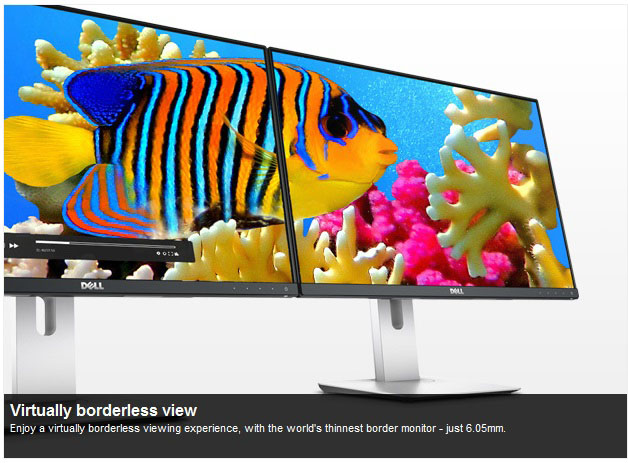
  • A 27" 2560 x 1440 IPS panel (LM270WQ??) with "Neo Blade", LG's ultra-thin bezel design. Expected to go into production in July.
  • A 27" 1920 x 1080 IPS panel (LM270WF7) with "Neo Blade". Already in production.


There's a weird one, the LM265SQ1 panel. It' a 26.5" 1:1 (yep, square!) IPS panel with a 1920 x 1920 res and sRGB colour space. For the second half ofthe year.


25"_ Two of these:

  • A 25" 2560 x 1080 21:9 aspect ratio IPS panel (LM250WW1) already in production.
  • A 2560 x 1440 res IPS panel (LM250WQ??) with Neo Blade expected to go into production in September.


24"_ Just 1: a 1920 x 1200 IPS module (LM240WU??) also with Neo Blade.


23.8"_ Two of them, and very interesting:

  • A 3840 x 2160 IPS panel (LM238WR1) with Adobe RGB gamut via its GB-r-LED backlight system. Already in production.
  • The other one is just the same panel but with sRGB gamut expected to go into production in August.


Finally, the 23", with the LM230WF7, a 1920 x 1080 res. Nothing else is know except for the fact that it may have an A-TW Polarizer. For those who don't know (like myself) it's a film added to the panel service designed to improve off-angle viewing of dark/black content.

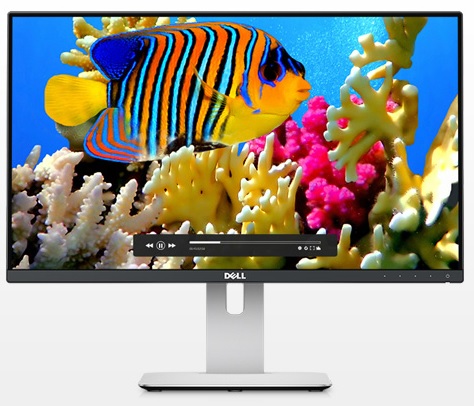
Oh, and to get a glimpse of what that "Neo Blade" slim bezel means, it's a ~6mm bezel. Here's a pic of a Dell Monitor that uses it, and how 2 of them look.


Please excuse my bad English.

Former gaming PC: i5-4670k@stock (for now), 16Gb RAM 1600 MHz and a GTX 1070

Current gaming PC: R5-7600, 32GB RAM 6000MT/s (CL30) and a RX 9060XT 16GB

Steam / Live / NNID : jonxiquet    Add me if you want, but I'm a single player gamer.