By using this site, you agree to our Privacy Policy and our Terms of Use. Close

Forums - PC - I want to Frankenstein me a PC for free, NEED HELP!

Nope, I am not asking for money. I live in a country where, from time to time, people trash their PCs for whatever reasons, sometimes for minor problems. They do this as the government from time to time asks people to let out their garbage so that the municipalities pick it up and take it to Trash Heaven.

So I was wondering, what if, what if I pick some of those computers up and take the good, trash the bad and make me a better PC than what I used to have a couple of weeks ago before it died the death in front of my eyes?

My problem is, and that is why I need help, I don't know much about hardware. So I was wondering if you guys could fill me in in the components I would need in order to piece one together.

Also, very important, I know there are some requirements of compatibility for components like videocards and such, right? Could you guys explain me about that? :)

Thanks in advance.


Nintendo is selling their IPs to Microsoft and this is true because:

http://gamrconnect.vgchartz.com/thread.php?id=221391&page=1

Around the Network

What you want to do is no easy task, are you sure that you want to do it? There's no guarantee that those trashed PCs will work.

Anyway, if you want to do it, here are some things that you should know about those compatibility problems.

Graphic Cards_ You shouldn't have any problems with them as long as the power supply is good enough and both the card and the motherboard aren't too old (more than 4 years).

Motherboard and CPU_ The easiest way to avoid any problems is to keep the whole package, keeping the mobo and the CPU that's in it. If you don't want to take that approach then you have to consider the "family" of that CPU and then look if the motherboard that you want can take that CPU. For example, if the CPU is an i7-920 then you have to look for a motherboard that has X58 written on it, or if it's an AMD Phenom II X4 940 then you'll have to look for a motherboard with AM2+ on it.

RAM_ Not much problem here as long as you don't start mixing them. Just look what kind of memory it is, DDR2 or DDR3, and be sure that your CPU/mobo work with that kind of RAM. For example, Intel's i3, i5 and i7 use DDR3 RAM but older CPUs like the Q6600/E6600 use DDR2. Remember also that RAM sticks go in pairs, unless it's an i7-920/930/950 in which case you will need 3 sticks.

You shouldn't have any problem with DVD's and Hard Drives as long as they are S-ATA.

In any case, remember that it's a very good idea to format any HDD you want to keep and install your copy of OS.


Please excuse my bad English.

Former gaming PC: i5-4670k@stock (for now), 16Gb RAM 1600 MHz and a GTX 1070

Current gaming PC: R5-7600, 32GB RAM 6000MT/s (CL30) and a RX 9060XT 16GB

Steam / Live / NNID : jonxiquet    Add me if you want, but I'm a single player gamer.

JEMC said:

What you want to do is no easy task, are you sure that you want to do it? There's no guarantee that those trashed PCs will work.

Anyway, if you want to do it, here are some things that you should know about those compatibility problems.

Graphic Cards_ You shouldn't have any problems with them as long as the power supply is good enough and both the card and the motherboard aren't too old (more than 4 years).

Motherboard and CPU_ The easiest way to avoid any problems is to keep the whole package, keeping the mobo and the CPU that's in it. If you don't want to take that approach then you have to consider the "family" of that CPU and then look if the motherboard that you want can take that CPU. For example, if the CPU is an i7-920 then you have to look for a motherboard that has X58 written on it, or if it's an AMD Phenom II X4 940 then you'll have to look for a motherboard with AM2+ on it.

RAM_ Not much problem here as long as you don't start mixing them. Just look what kind of memory it is, DDR2 or DDR3, and be sure that your CPU/mobo work with that kind of RAM. For example, Intel's i3, i5 and i7 use DDR3 RAM but older CPUs like the Q6600/E6600 use DDR2. Remember also that RAM sticks go in pairs, unless it's an i7-920/930/950 in which case you will need 3 sticks.

You shouldn't have any problem with DVD's and Hard Drives as long as they are S-ATA.

In any case, remember that it's a very good idea to format any HDD you want to keep and install your copy of OS.

JEMC: Sorry for my late reply but I became kind of busy with other stuff as to dedicate proper time to the project. Thank you for that explanation, it gives me an idea. :) I still have some issues identifying some components. For example, I have been getting my dead computer opened and taking a look inside. The computer is rather old, bought it around 2004 or 05 and changed the motherboard around 2007 or 08. Seems the motherboard and the videocard are fused together in here. My old man talked to a friend of his and he will find me a new motherboard, power supply and more RAM, so seems I will revive the dead this next month. Still I want to try to build a new computer and I am using mine to learn about hardware.

My predicament now is identifying the CPU in the computer. I googled some pictures up of CPUs and they seem to come in different forms, but I fail to identify the CPU in my computer. I took some pictures of the interior of my fossil, care to take a look and help me out identifying it?

1)

2)

3)

4)

5)

If the pics are not clear enough I could try to take better ones for you.

Also, you tell me that if I am to pair CPUs and mobos I need to identify their "code" and look for those inside their family. From the pictures, could you identify me the codes for the CPU and the mobo? I am not sure what is the mobo code among all that is written there and well, I don't even know where is the CPU as I stated above. lol

About RAM. Where can I find the information where it says what kind of DD it is? You say RAM sticks come in pairs or three at a time but my computer came only with a RAM stick, as you can see in pic #3. Maybe it is because the PC is old or they ripped me off, right?

I hope I didn't complicate things up. lol

@pezus: the goal is not to use any money. I don't plan to use it for gaming, I just would like to see if I can make myself a computer out of refuse.


Nintendo is selling their IPs to Microsoft and this is true because:

http://gamrconnect.vgchartz.com/thread.php?id=221391&page=1

Your CPU sits underneath that FAN and those metallic fins under the fan(heat sink/cooler). You would need to take a flathead screwdriver and remove the CPU cooler to see the CPU. I don't mean to be rude, but you are going to really struggle badly to cobble together a machine if you don't have the necessary knowledge to even readily identify the parts inside a machine let alone be able to determine which ones are dead.

Perhaps going and reading up on Hardware a little could help. start with some easy sites like tomshardware or sharkeyextreme as they regularly have some build guides for new machines/hardware so you can at least learn some of the basics.


PS: if I am not mistaken I think that is a very old ASRock motherboard (they used to be crap), at best it would be DDR2 memory in it, but I think it may even be only a DDR motherboard, regardless their is unlikely to be anything worth salvaging off it.


@AbbathTheGrim: As nanarchy says, and I also said in my previous post, what you are trying to do is hard and you little knowledge of the hardware, it will be a lot harder. Practicing with an old computer is a good start, but it's better if you try to learn more trough the web.

With that said, as you've been told the CPU is under the fan and the heatsink. If you look the motherboard from behind, you'll see that there are 4 push pins where the fan/heatsink touches the motherboard, release them (you can use the help of a screwdriver). If the heatsink doesn't want to go out try to rotate it left-right several times before pulling it out. What you'll see is something like this

That thing covered in grey stuff is the CPU, and the grey stuff is called thermal paste, which is used to allow the heat of the CPU to go to the heatsink. To know which CPU it is, and I'm talking about the ones of your future preys because you can know what CPU your actual PC have using Windows (right click on the My PC icon => properties => General), you need to remove the thermal paste.

DO NOT USE WATER!

If you can/want, you can buy specific products for that task. If not, use dry tissues with a little bit of alcohol. To do it safer, do it with the CPU outside of the motherboard, but be carefull with the pins that are under the chip. Don't bend them or it won't work.

By the way, when you build your Frankenstein, you'll need to put some of that thermal paste. Otherwise the CPU will overheat.

Once the CPU is clean you'll see something written on it, and here you'll be able to see what CPU it is. For example:

 Intel Pentium 4  Intel core 2 duo

  Intel i7 920

Knowing the CPU you'll be able to use the web to find which motherboards are compatible with it.

RAM

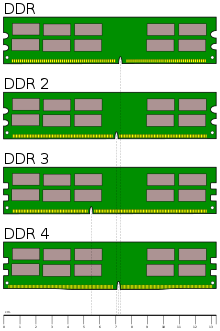
Your PC only has 1 stick but that may be because your CPU only needs one. Modern CPUs use what's called "dual channel memory" and that means using 2 sticks of RAM (or 4, 2x2). To know what kind of RAM you want/need with your CPU you can do 2 things:

1- Look at the sticker. It can either put what type of RAM it is (DDR2, DDR3) or it may have something like "PCxxxx" where the "x" are numbers. DDR2 uses numbers from 3200 to 8500. DDR3 numbers start at 6400 and go to 17000. For those sticks with 6400 or 8500 on it, chech the other option.

2-Use this pic to differentiate between them.


Please excuse my bad English.

Former gaming PC: i5-4670k@stock (for now), 16Gb RAM 1600 MHz and a GTX 1070

Current gaming PC: R5-7600, 32GB RAM 6000MT/s (CL30) and a RX 9060XT 16GB

Steam / Live / NNID : jonxiquet    Add me if you want, but I'm a single player gamer.

Around the Network

Thanks guys I'll check for those tutorials you recommend. Thank you all.


Nintendo is selling their IPs to Microsoft and this is true because:

http://gamrconnect.vgchartz.com/thread.php?id=221391&page=1

You can do all that! Is there a way you can have people donate stuff before they throw it away? Like contact a club, many people will have extra parts they are often happy to give you. Or craigslist, or put up a few fliers?

The one exception I would recommend is you may want to buy a good power supply - they can be hazardous to work on, an when they wear out I don't recommend fixing them. The rest of the 'donated' products could be just fine.

Also, they shouldn't be throwing away old computer parts. They should be recycled - many of them contain exotic materials with are both rare, useful, and hazardous in land fills.

Good luck, I think it's a neat thing you are doing.


Really not sure I see any point of Consol over PC's since Kinect, Wii and other alternative ways to play have been abandoned. 

Top 50 'most fun' game list coming soon!


Tell me a funny joke!