



@AbbathTheGrim: As nanarchy says, and I also said in my previous post, what you are trying to do is hard and you little knowledge of the hardware, it will be a lot harder. Practicing with an old computer is a good start, but it's better if you try to learn more trough the web.
With that said, as you've been told the CPU is under the fan and the heatsink. If you look the motherboard from behind, you'll see that there are 4 push pins where the fan/heatsink touches the motherboard, release them (you can use the help of a screwdriver). If the heatsink doesn't want to go out try to rotate it left-right several times before pulling it out. What you'll see is something like this

That thing covered in grey stuff is the CPU, and the grey stuff is called thermal paste, which is used to allow the heat of the CPU to go to the heatsink. To know which CPU it is, and I'm talking about the ones of your future preys because you can know what CPU your actual PC have using Windows (right click on the My PC icon => properties => General), you need to remove the thermal paste.
DO NOT USE WATER!
If you can/want, you can buy specific products for that task. If not, use dry tissues with a little bit of alcohol. To do it safer, do it with the CPU outside of the motherboard, but be carefull with the pins that are under the chip. Don't bend them or it won't work.
By the way, when you build your Frankenstein, you'll need to put some of that thermal paste. Otherwise the CPU will overheat.
Once the CPU is clean you'll see something written on it, and here you'll be able to see what CPU it is. For example:
 Intel Pentium 4
  Intel core 2 duo
 Intel i7 920
Knowing the CPU you'll be able to use the web to find which motherboards are compatible with it.
RAM
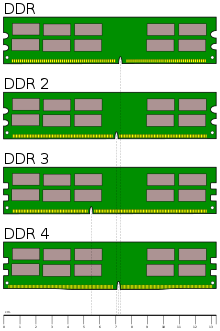
Your PC only has 1 stick but that may be because your CPU only needs one. Modern CPUs use what's called "dual channel memory" and that means using 2 sticks of RAM (or 4, 2x2). To know what kind of RAM you want/need with your CPU you can do 2 things:
1- Look at the sticker. It can either put what type of RAM it is (DDR2, DDR3) or it may have something like "PCxxxx" where the "x" are numbers. DDR2 uses numbers from 3200 to 8500. DDR3 numbers start at 6400 and go to 17000. For those sticks with 6400 or 8500 on it, chech the other option.
2-Use this pic to differentiate between them. 
Please excuse my bad English.
Former gaming PC: i5-4670k@stock (for now), 16Gb RAM 1600 MHz and a GTX 1070
Current gaming PC: R5-7600, 32GB RAM 6000MT/s (CL30) and a RX 9060XT 16GB
Steam / Live / NNID : jonxiquet Add me if you want, but I'm a single player gamer.