

curl-6 said:
The thing is though, for background objects passing by at high speeds you don't really need tesselation or displacement because the player won't get a chance to study in detail for more than a second or so, so normal mapping should be sufficient to fool the eye for that brief glimpse. If it was something you see up close, like the player's vehicle, it'd be another story, but I'm pretty sure the meshes they're talking about are for stuff like terrain. |
Good point, although the only way to be sure would be by having the game finished and checking the details on the environment by just stopping the car, normal mapping may fool the eye in some occasions, but becomes very obvious when objects are parallel to the view cause they dont create a silhoutte and there are no internal occlusions; also the shadows do not reflect the appearence of the bumps of the objects
http://help.chaosgro...isplacement.htm
"
What is displacement mapping?
Displacement mapping is a technique for adding geometric detail to surfaces at render time. In contrast with bump mapping, which works by just changing the surface normal to create the illusion of surface detail, displacement mapping modifies the surface itself.Here is an example of the same object rendered with bump mapping and with displacement mapping:

Original object

Bump mapping

Displacement mapping
In the case of displacement mapping, the surface is actually modified, which leads to correct outline, shadow and GI. In the case of bump mapping, although the surface appears modified, the outline and the shadow stay the same.
Note that displacement is different from other kinds of shading, since it needs to modify the actual object surface. Therefore an object must be displaced before it can be rendered. This is why in V-Ray displacement is represented with a modifier (although the modifier can take the displacement map from the object material).
"
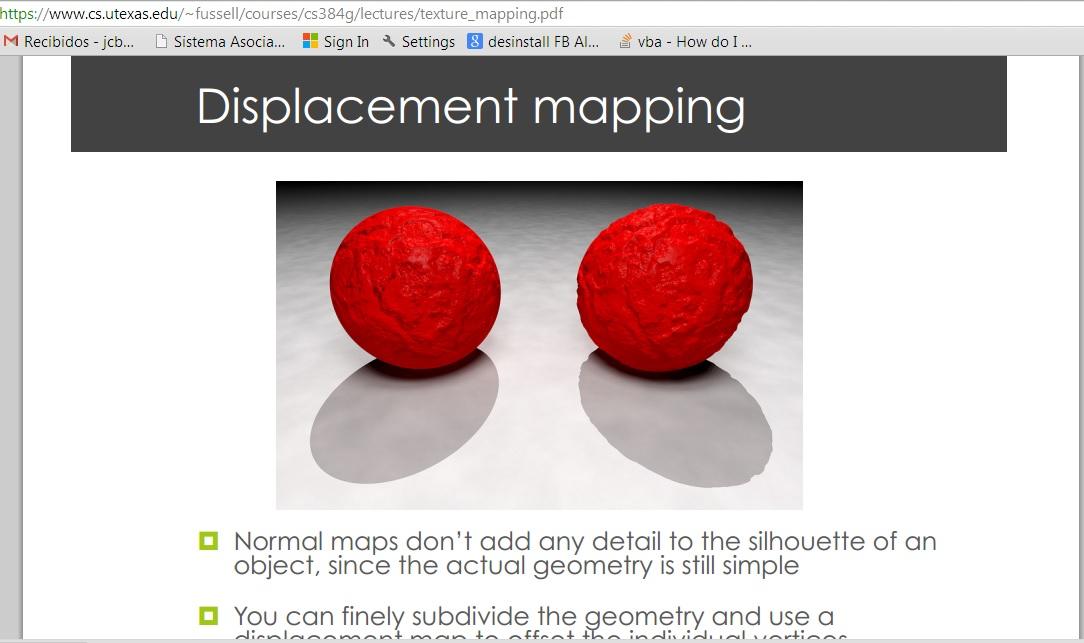
Normal mapping is just like bump mapping with little improvements here and there but with same limitations(the object at the left uses normal mapping and the right one is the dispalcement map)
https://www.cs.utexas.edu/~fussell/courses/cs384g/lectures/texture_mapping.pdf
"
Normal maps don’t add any detail to the silhouette of an
object, since the actual geometry is still simple
"
limitation of bump mapping vs dispalcement
https://diglib.eg.or...df.abstract.pdf
"
Bump mapping does not really alter the underlying geometry,
but only perturbs the normals on the surface. For small irregularities
on a surface, bump mapping is ideal, since it does not increase
the amount of geometry, but gives the impression of real textured
surfaces.
The limitation of bump mapping becomes obvious when
the surface is parallel to the viewer and the Bump does not create a
silhouette. Also as a surface moves in perspective space the shape
created in the viewers mind by the bump map will not occlude other
objects.
To add real geometric detail to a flat surface, displacement mapping,
first introduced by Cook [2], can be used
"
here we have examples with the limitation of normal maps and that they only fake geometry and silhoute does not change

on the other hand here we have the results with displacement mapping
http://stoneschool.c...2004/index.html
"
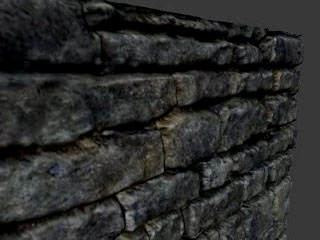
At left is the basic result: a plane with real displacement mapping. Note that this is not bump or normal mapping; it's true displacement mapping. The silhouette edge is correct, and there are internal occlusions from the displaced surfaces, neither of which you get from bump/normal mapping.
The trick to this is pretty much what the title says: it's doing a discretized ray cast within the volume of the maximum displacement in the GPU. The movie that comes along with the sketch has a pretty clear diagram about what they're doing.
"
By taking this informationa and examples into account, we coould determine if they used dispalcement or normal maps in the parallel objects liek the rocks, mountains, etc; as for the terrain would be trickier to tell. We should take into consideration the limitations of the bump and normall maps and take a closer look to the objects and their shadows on the game and also not forget to look at the internal occlusions