By using this site, you agree to our Privacy Policy and our Terms of Use. Close

Forums - Microsoft - Screen Tearing

averyblund said:

So I've had my 360 for about 3 months now and have gotten a ton of enjoyment out of it but one thing really bugs the hell out of me. There seems to be an insane amount of screen tearing across a wide range of games. Now the offensiveness seems to vary title to title but in some cases it really affects the mood of the game. Do most devs not use v-sync in their games? Oddly enough I have not noticed this much on the Wii and only here and there on my PS2 (God of War II had a lot). Is this a HW issue on my side or is this just lazy programming? Maybe I'm just being overly picky, but I was pretty surprised that something like this would be allowed on a console whose selling point is high quality graphics. Any fixes would be appreciated. 


Most 360 games have tearing, you will have to live with it or buy a cheap pc-system. Even the cheap system has already more power than a 360, better graphics and almost all good 360 games.



Around the Network
WereKitten said:

^^The fact that the OP talked about v-sync leads me to think that he knows what screen tearing is. Display latency and framerate hiccups are very different from tearing to any naked eye.

And to the OP: yes, HD consoles seem to suffer from a lot of tearing, especially noticeable if you are a former PC gamer. So much common that Digital Foundry always runs an analysis on the percentage of torn frames alongside the FPS statistics.


You are correct. I'm mostly a PC gamer, so perhaps I'm overly sensitive but it still bugs the hell out of me to the point where I would gladly take less visual fidelity to correct it. Like I said I rarely see this on my PS2 or Wii which adds to the frustration. I don't have access to a PS3 to compare with.


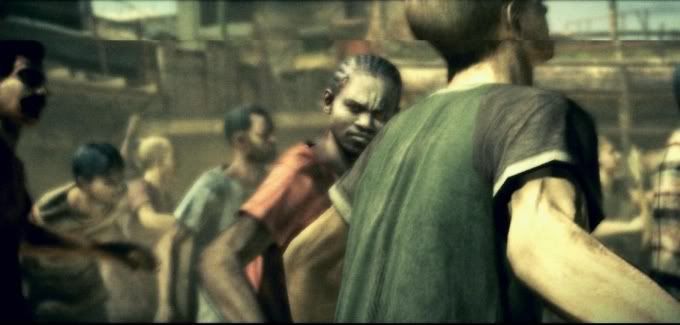
Here is 2 random examples of tearing I found on the net to illustrate what I'm talking about. It gets a lot worse than this at times though.


If this is a frame buffer issue as it would seem to be I wonder if there is a defect in the 360's implementation of vsync or if there is something wrong with my unit itself. 


XBL: WiiVault Wii: PM me  PSN: WiiVault

PC: AMD Athlon II Quadcore 635 (OC to 4.0ghz) , ATI Radeon 5770 1GB (x2)

MacBook Pro C2D 2.8ghz, 9600m GT 512 iMac: C2D 2.0, X2600XT 256


WereKitten said:

^^The fact that the OP talked about v-sync leads me to think that he knows what screen tearing is. Display latency and framerate hiccups are very different from tearing to any naked eye.

And to the OP: yes, HD consoles seem to suffer from a lot of tearing, especially noticeable if you are a former PC gamer. So much common that Digital Foundry always runs an analysis on the percentage of torn frames alongside the FPS statistics.

Screen tearing is a phenomenon in video where a newly rendered frame overlaps a previously rendered frame, creating a torn look as two parts of an object (such as a wall) don't line up. This occurs when the output device sends frames out of sync with the display's refresh rate.

Screen tearing usually only happens when the framerate of the game is above the refresh rate of the device.  Ghosting, however, can happen on anything because it completely relies on the refresh rate of your device and not on the actual FPS the game can run at.  A monitor or TV with a 60z refresh rate can only produce 60 fps without tearing.  Any higher and it tears.  Screen tearing does not usually happen when the framerate is below the refresh rate (which most consoles have frame rates well below 60fps).

He did a horrible job describing the symptoms occuring, and he probably knows of V-Sync because he plays computer games as well.  Even if a console game has V-Sync, screen tearing will be stopped but it can still show ghosting due to a slow refresh rate on your display (8ms especially).


z101 said:
averyblund said:

So I've had my 360 for about 3 months now and have gotten a ton of enjoyment out of it but one thing really bugs the hell out of me. There seems to be an insane amount of screen tearing across a wide range of games. Now the offensiveness seems to vary title to title but in some cases it really affects the mood of the game. Do most devs not use v-sync in their games? Oddly enough I have not noticed this much on the Wii and only here and there on my PS2 (God of War II had a lot). Is this a HW issue on my side or is this just lazy programming? Maybe I'm just being overly picky, but I was pretty surprised that something like this would be allowed on a console whose selling point is high quality graphics. Any fixes would be appreciated. 


Most 360 games have tearing, you will have to live with it or buy a cheap pc-system. Even the cheap system has already more power than a 360, better graphics and almost all good 360 games.

Find me a PC that can outperform the 360's graphics capabilities and costs $300 or less.


averyblund said:
WereKitten said:

^^The fact that the OP talked about v-sync leads me to think that he knows what screen tearing is. Display latency and framerate hiccups are very different from tearing to any naked eye.

And to the OP: yes, HD consoles seem to suffer from a lot of tearing, especially noticeable if you are a former PC gamer. So much common that Digital Foundry always runs an analysis on the percentage of torn frames alongside the FPS statistics.


You are correct. I'm mostly a PC gamer, so perhaps I'm overly sensitive but it still bugs the hell out of me to the point where I would gladly take less visual fidelity to correct it. Like I said I rarely see this on my PS2 or Wii which adds to the frustration. I don't have access to a PS3 to compare with.


Here is a random example of tearing I found on the net to illustrate what I'm talking about. It gets a lot worse than this at times though.


If this is a frame buffer issue as it would seem to be I wonder if there is a defect in the 360's implementation of vsync or if there is something wrong with my unit itself. 

Now this is definitely tearing you are describing.  I have never noticed anything like this at all on any 360 game I have played.  I have noticed ghosting, but never any actual screen tearing like you seem to be seeing.

I also play PC games, which is why I can spot ghosting on my HDTV and console games (display does not refresh as fast as my PC monitor).


Around the Network

Just found this article which is certainly not making me feel any better. Especially after looking at the date. Just ran downstairs and tested PD: Zero and the issues are certainly there as described in the interview.


XBL: WiiVault Wii: PM me  PSN: WiiVault

PC: AMD Athlon II Quadcore 635 (OC to 4.0ghz) , ATI Radeon 5770 1GB (x2)

MacBook Pro C2D 2.8ghz, 9600m GT 512 iMac: C2D 2.0, X2600XT 256


I have only played a few games on my 360 but I can say that RE5 does it somewhat often or at least every 15-20 minutes or so of game play. It especially bother me and I can deal with it but it is noticeable.


I'll come up with something better eventually...

nightsurge said:
WereKitten said:

^^The fact that the OP talked about v-sync leads me to think that he knows what screen tearing is. Display latency and framerate hiccups are very different from tearing to any naked eye.

And to the OP: yes, HD consoles seem to suffer from a lot of tearing, especially noticeable if you are a former PC gamer. So much common that Digital Foundry always runs an analysis on the percentage of torn frames alongside the FPS statistics.

Screen tearing is a phenomenon in video where a newly rendered frame overlaps a previously rendered frame, creating a torn look as two parts of an object (such as a wall) don't line up. This occurs when the output device sends frames out of sync with the display's refresh rate.

Screen tearing usually only happens when the framerate of the game is above the refresh rate of the device.  Ghosting, however, can happen on anything because it completely relies on the refresh rate of your device and not on the actual FPS the game can run at.  A monitor or TV with a 60z refresh rate can only produce 60 fps without tearing.  Any higher and it tears.  Screen tearing does not usually happen when the framerate is below the refresh rate (which most consoles have frame rates well below 60fps).

He did a horrible job describing the symptoms occuring, and he probably knows of V-Sync because he plays computer games as well.  Even if a console game has V-Sync, screen tearing will be stopped but it can still show ghosting due to a slow refresh rate on your display (8ms especially).


Tearing can happen at much lower framerate if the v-sync signal is not honoured because it only means that the framerate does not align neatly with the vertical blanks. That's why, i suppose, games tend to run at 60 or 30 fps: it makes this alignment easier. It will happen for sure above 60fps (if that's your display's refresh rate) in the same conditions.

Ghosting does not look like tearing at all, that's why I found his symptoms description totally unambiguous. Actually ghosting will smooth out the tearing in some measure, a bit like a merge algorithm does for deinterlacing.

Please read this and this for examples of games running at 30fps, but with a percentage of torn frames between 10% and 50%.


"All you need in life is ignorance and confidence; then success is sure." - Mark Twain

"..." - Gordon Freeman

I have never seen any tearing on either the 360 or the Wii. However I heard the RE5 demo on the 360 has tearing issues when running at 1080p (I run at 720p). I don't know if they fixed that in the final version.

What resolution are you using?


My Mario Kart Wii friend code: 2707-1866-0957

NJ5 said:
I have never seen any tearing on either the 360 or the Wii. However I heard the RE5 demo on the 360 has tearing issues when running at 1080p (I run at 720p). I don't know if they fixed that in the final version.

What resolution are you using?


Then you probably just don't notice it.  But it does exist in many console games and I really hope no one would try to dispute that fact.

Oh, and since no one seems to have really respond to the OP, there's nothing you can do about it, it's just something you have to live with.  It's not your hardware.  It's not like a PC where you can try forcing v-sync with drivers.  Either the game has it enabled or the game doesn't.  And it's a shame that a lot of games don't.