By using this site, you agree to our Privacy Policy and our Terms of Use. Close

Forums - PC - Help making my PC good for gaming....

dreamcast210 said:
Raistline said:

Can you post the link to whch card you decdied on?

I want to make sure you don't accidentally purchase one that won't fit, it has to be 9.5" or less in length and if it is almost 9.5" you will need to make sure the power connection is on the side and not the back of the card.

Sure. I'm going with Amazon for the purchase because it's a $1 cheaper and free shipping. https://www.amazon.com/dp/B0167OW8M0/ref=wl_it_dp_o_pC_nS_ttl?_encoding=UTF8&colid=37GIODHN6SPA0&coliid=IRVTQ0QGAOJAN&psc=1

Yup, that will most definitely fit, and the higher memory will help with Anti-Ailiasing, open world games, and higher resolutions.

It is starting to sound like you are just about ready for you upgrade. Feel free to lean on us if you have any further questions about the build.


Around the Network

Thanks. Appreciate all the help. I will report back with how everything goes. Gotta love a great community who's willing to help!


Author of science fiction and other genres, I write under the pen name Desmond Shepherd. The second season of my series The Permanent Man premieres on November 11, 2014. Pre-order the season premiere The Walls Have Ears on Amazon today!

happy to help, just remember to take your time and be careful when it comes to putting it all together, just as long as you're calm and don't panic everything should go fine. If you've got any doubts about how something should go together google,youtube or here are all full of people who've probably all done the same steps and questions before so should be able to help.

in fact one thing which I didn't think of was cooling since without a graphics card the 620might not have come with a case fan, you'll most certainly need one after the upgrades to keep all that power cooled.


Why not check me out on youtube and help me on the way to 2k subs over at www.youtube.com/stormcloudlive

Ganoncrotch said:
happy to help, just remember to take your time and be careful when it comes to putting it all together, just as long as you're calm and don't panic everything should go fine. If you've got any doubts about how something should go together google,youtube or here are all full of people who've probably all done the same steps and questions before so should be able to help.

in fact one thing which I didn't think of was cooling since without a graphics card the 620might not have come with a case fan, you'll most certainly need one after the upgrades to keep all that power cooled.

OK. What's a case fan? How would I know if I have one in my PC or not?


Author of science fiction and other genres, I write under the pen name Desmond Shepherd. The second season of my series The Permanent Man premieres on November 11, 2014. Pre-order the season premiere The Walls Have Ears on Amazon today!

Oh and don't forget, don't force anything into a slot. I know how it sounds almost silly to say this but I have seen a lot of people that tried to force a RAM stick in place with too much force and broke both the mobo and the stick of RAM because they had it upside down.

All slots on a PC are keyed to prevent you from pitting anything in incorrectly so just pay attention to that. This goes for the power connectors too.

And I promise you, you are quite lucky that everything is keyed now. On my first build, pack in the day of Pentium (not even Pentium II) you could easily connect power cables to the wrong place. Most IDE cables could be installed upside down without knowing it, and the motherboards had jumpers for just about every setting that you now see inside the BIOS. Not to mention ISA and PCI slots that used the same port for different verisons/speed ratings and were not backward/forwrad compatible.


Around the Network
Raistline said:

Oh and don't forget, don't force anything into a slot. I know how it sounds almost silly to say this but I have seen a lot of people that tried to force a RAM stick in place with too much force and broke both the mobo and the stick of RAM because they had it upside down.

All slots on a PC are keyed to prevent you from pitting anything in incorrectly so just pay attention to that. This goes for the power connectors too.

And I promise you, you are quite lucky that everything is keyed now. On my first build, pack in the day of Pentium (not even Pentium II) you could easily connect power cables to the wrong place. Most IDE cables could be installed upside down without knowing it, and the motherboards had jumpers for just about every setting that you now see inside the BIOS. Not to mention ISA and PCI slots that used the same port for different verisons/speed ratings and were not backward/forwrad compatible.

At that time too Dell had a completely different power supply layout to every other PC manufacturer, they went with a proprietary line up for the voltages, meant you couldn't swap out a dell psu for a normal one, ahh... good... awful times.

And yeah Dreamcast, make sure you move the little blue (normally) bit of plastic to the side when you're sliding the graphics card into the slot for it, just a slight move to the side on some motherboards while you slide in the card.


Why not check me out on youtube and help me on the way to 2k subs over at www.youtube.com/stormcloudlive

dreamcast210 said:
Ganoncrotch said:
happy to help, just remember to take your time and be careful when it comes to putting it all together, just as long as you're calm and don't panic everything should go fine. If you've got any doubts about how something should go together google,youtube or here are all full of people who've probably all done the same steps and questions before so should be able to help.

in fact one thing which I didn't think of was cooling since without a graphics card the 620might not have come with a case fan, you'll most certainly need one after the upgrades to keep all that power cooled.

OK. What's a case fan? How would I know if I have one in my PC or not?

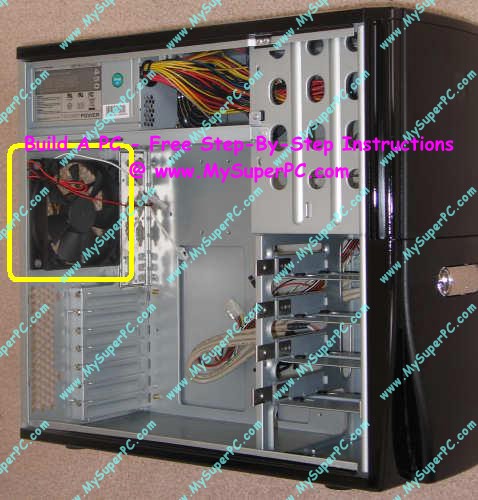
This guy right here, under your power supply and above where your graphics card will fit, some PCs which ship without graphics cards have been known to come without a fan there, just have the grate for a fan to be attached but they just rely on passive cooling of air going into the case.

Also never consider cooling a PC by operating it with the side of the case off! if anything the PC will run a lot hotter with the side plate open because it's designed for air flow when the case is closed.

Edit - FML that is some awful plastering of a URL on that picture... tip, never go to my super pc . com lol


Why not check me out on youtube and help me on the way to 2k subs over at www.youtube.com/stormcloudlive

Ganoncrotch said:
dreamcast210 said:

OK. What's a case fan? How would I know if I have one in my PC or not?

This guy right here, under your power supply and above where your graphics card will fit, some PCs which ship without graphics cards have been known to come without a fan there, just have the grate for a fan to be attached but they just rely on passive cooling of air going into the case.

Also never consider cooling a PC by operating it with the side of the case off! if anything the PC will run a lot hotter with the side plate open because it's designed for air flow when the case is closed.

Edit - FML that is some awful plastering of a URL on that picture... tip, never go to my super pc . com lol

OK. Cool. It already has a fan there.


Author of science fiction and other genres, I write under the pen name Desmond Shepherd. The second season of my series The Permanent Man premieres on November 11, 2014. Pre-order the season premiere The Walls Have Ears on Amazon today!

Ganoncrotch said:
Raistline said:

Oh and don't forget, don't force anything into a slot. I know how it sounds almost silly to say this but I have seen a lot of people that tried to force a RAM stick in place with too much force and broke both the mobo and the stick of RAM because they had it upside down.

All slots on a PC are keyed to prevent you from pitting anything in incorrectly so just pay attention to that. This goes for the power connectors too.

And I promise you, you are quite lucky that everything is keyed now. On my first build, pack in the day of Pentium (not even Pentium II) you could easily connect power cables to the wrong place. Most IDE cables could be installed upside down without knowing it, and the motherboards had jumpers for just about every setting that you now see inside the BIOS. Not to mention ISA and PCI slots that used the same port for different verisons/speed ratings and were not backward/forwrad compatible.

At that time too Dell had a completely different power supply layout to every other PC manufacturer, they went with a proprietary line up for the voltages, meant you couldn't swap out a dell psu for a normal one, ahh... good... awful times.

And yeah Dreamcast, make sure you move the little blue (normally) bit of plastic to the side when you're sliding the graphics card into the slot for it, just a slight move to the side on some motherboards while you slide in the card.

I remember that DELL BS all too well. Gateway Computers also did the exact same thing.

A fond memory I have from back in the day was purchasing a CD-Burner. The CD burner did not list it's requirements on the box. At the time I had a PII 233 OC'd to ~266 (FSB Jumber Oveclock), I don't remeber how much RAM I had, but it was probably 32MB. So I went ahead and installed the CD-Rom which used the 33Mhz IDE standard (this was the first time IDE was keyed that I experienced). The mobo only had 1 IDE port and 1 Floppy port so I had to figure swap the jumper to set the CD-Burner as SLAVE. I could not use Line becuase it was in the 1st position on the cable. After installing the drivers from the Floppy disc I found I forgot set the HDD as Master and the CD-Burner was not recognized. 

I got that solved and everything was working except for one critial part. Burning CD's were running at .3X on an 8X burner and I constantly got Buffer Underrun errors. I had to call the support line for the drive and found out that the reason it did not work correctly was becuase the minimum requirements was 66mhz IDE and at least a 300mhz CPU with at minimum 512kb l2 cache, and 32MB of memory. I had to suck it up and return the CD-Burner, but I was able to find a 4X burner that met my system requirements. In the end my CPU was a tad too slow and the IDE bus was 1 step short. The CPU speed caused the slow burning and the IDE speed caused the buffer underrun errors. Oh Fun times.


Raistline said:
Ganoncrotch said:

At that time too Dell had a completely different power supply layout to every other PC manufacturer, they went with a proprietary line up for the voltages, meant you couldn't swap out a dell psu for a normal one, ahh... good... awful times.

And yeah Dreamcast, make sure you move the little blue (normally) bit of plastic to the side when you're sliding the graphics card into the slot for it, just a slight move to the side on some motherboards while you slide in the card.

I remember that DELL BS all too well. Gateway Computers also did the exact same thing.

A fond memory I have from back in the day was purchasing a CD-Burner. The CD burner did not list it's requirements on the box. At the time I had a PII 233 OC'd to ~266 (FSB Jumber Oveclock), I don't remeber how much RAM I had, but it was probably 32MB. So I went ahead and installed the CD-Rom which used the 33Mhz IDE standard (this was the first time IDE was keyed that I experienced). The mobo only had 1 IDE port and 1 Floppy port so I had to figure swap the jumper to set the CD-Burner as SLAVE. I could not use Line becuase it was in the 1st position on the cable. After installing the drivers from the Floppy disc I found I forgot set the HDD as Master and the CD-Burner was not recognized. 

I got that solved and everything was working except for one critial part. Burning CD's were running at .3X on an 8X burner and I constantly got Buffer Underrun errors. I had to call the support line for the drive and found out that the reason it did not work correctly was becuase the minimum requirements was 66mhz IDE and at least a 300mhz CPU with at minimum 512kb l2 cache, and 32MB of memory. I had to suck it up and return the CD-Burner, but I was able to find a 4X burner that met my system requirements. In the end my CPU was a tad too slow and the IDE bus was 1 step short. The CPU speed caused the slow burning and the IDE speed caused the buffer underrun errors. Oh Fun times.

Ouch and at a time too when you couldn't buy a stack of 100CD/DVDs for €15 I'll bet, a bad learning experience. PC's really have gotten a lot more user friendly to upgrade and repair alright, people should be thankful if they don't know anything about phrases like Memory timing or even speeds (since most will just run at the lowest speed now if you mismatch RAM).

One thing weirdly which has gotten harder is upgrading CPU's, I guess it's down to them requiring heavy duty heat sinks to be bolted on really tightly but when I was upgrading my old AMD 700mhz to a massively more powerful AMD 750mhz processor it was about as hard as changing a game on the megadrive.

Chip and Heatsink were all just one big cartridge type thing which slotted right onto the board, easy as pie compared to ripping out some of the Intel heatsinks in use today.

.....

Of course it was less powerful than my phone today... but still, was easy!


Why not check me out on youtube and help me on the way to 2k subs over at www.youtube.com/stormcloudlive