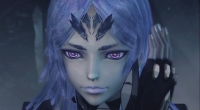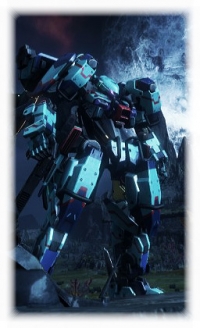
All of my skells; I named the one I am using (the one in the front) Monado.

My Shulk look-alike, used him and three other avatars for non-story missions.

The avatar that I first created. Candid & Credible bestest AM! :D
All of my skells; I named the one I am using (the one in the front) Monado.

My Shulk look-alike, used him and three other avatars for non-story missions.

The avatar that I first created. Candid & Credible bestest AM! :D
spemanig said:
This is probably going to come off as a backhanded compliment, but I promise that it isn't. I absolutely love how flat, dull, and monotone you decided to color your skells. It ironically makes them ironically the most visually striking and interesting skells I've seen so far. They look very bold. |
Honestly, that was the point, lol. The flat monotone color really makes them pop out.
| spemanig said: You can't edit your avatar later, can you? |
I heard you could, after a sidequest is completed to unlock it after a certain chapter.
My avatar:
My Skell(s)
Platforms: Wii U, New 3DS, PS4, PC
currently playing:
-Yoshi's Wooly World
-Pokemon X
-Fire Emblem Fates
Zone: Europe (Germany)
| bigtakilla said: Honestly, that was the point, lol. The flat monotone color really makes them pop out. |
Yeah, I honestly love it. It looks so unique! The rules of aesthetics mean so much to me (which is why my crew is dress so fashionable), and you have a great grasp on how to make striking visuals for your Skell - way better than me lol. I have work to do!
| Nuvendil said: I heard you could, after a sidequest is completed to unlock it after a certain chapter. |
Is it a spoiler, or can you tell me how? I've beaten chapter 7 and am almost ready for chapter 8. (I'm lvl29 and I need to be lvl30)
You only need to beat chapter 5 in order to re-customize your character.
https://www.youtube.com/watch?v=7DvJQttJKU4
The first step is explained in the description, video is about the second part.
| TJZ_Link said: You only need to beat chapter 5 in order to re-customize your character. https://www.youtube.com/watch?v=7DvJQttJKU4 The first step is explained in the description, video is about the second part. |
Thank you so much! I've wanted to do this for a long time lol.
About Us |
Terms of Use |
Privacy Policy |
Advertise |
Staff |
Contact
Display As Desktop
Display As Mobile
© 2006-2026 VGChartz Ltd. All rights reserved.