By using this site, you agree to our Privacy Policy and our Terms of Use. Close

Forums - Gaming - Video Game Favourites!

Favorite game for fun: Pokemon Alpha Sapphire

Favorite game for story: Xenogears

Favorite game for atmosphere: Super Metroid

Favorite controller: Dualshock 3

Favorite platform: NDS or PC

Near perfect game: Super Metroid

Favorite male character: Gordon Freeman

Favorite female character: Samus

Favorite soundtrack: Xenoblade Chronicles

First video game: Super Mario Bros 


Around the Network

To post an image saved on your computer you first need to upload it to a website. "imgur.com" is one of the most convenient sites for this purpose. (signing up is quick and easy)

Once the image is uploaded, right-click on the image and select "copy image location" or "copy image URL" or whatever it is called on your browser.

Using "Rich Text Reply", click the green "insert/edit image" button, paste the image location and then click "insert".

If the image is too big, highlight it, click "insert/edit image" again and try smaller dimensions.


It may seem like a hassle, but you only need to learn it once to be able to post images for a lifetime.


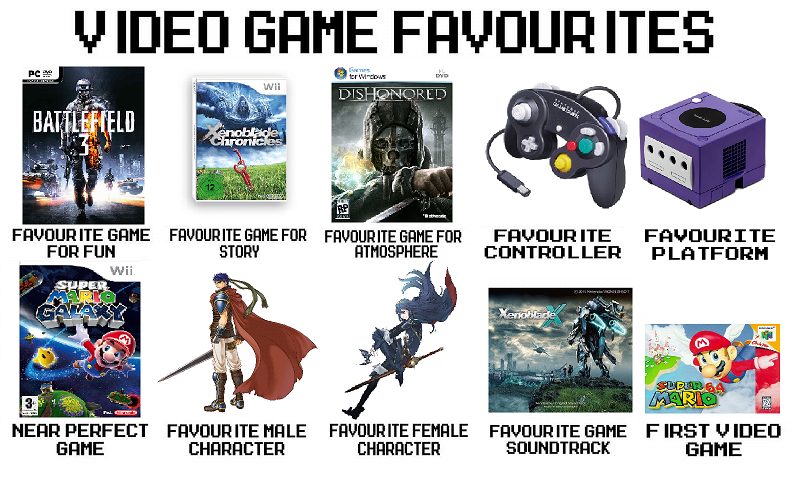
Here's mine


Great idea! This is me tagging for later, I'll fill up the template with my picks later today .


It was hard to decide the game for fun (Mario Kart 8, Smash 4 and Battlefield Bad Company 2 being contenders as well) and the game for atmosphere (Skyrim has a fantastic atmosphere) but those should represent my favorites well.

If the pic isn't shown, here is a quick list:
Game For Fun: Battlefield 3
Game For Story: Xenoblade Chronicles
Game For Atmosphere: Dishonored
Controller: Gamecube Controller
Platform: Gamecube
Near Perfect Game: Super Mario Galaxy
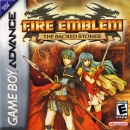
Male Character: Ike
Female Character: Lucina
Game Soundtrack: Xenoblade X
First Video Game: Super Mario 64


Playing: F1 2016 (PC), Uncharted: The Lost Legacy (PS4)
Watching: Hajime no Ippo, Attack on Titan (4th time)
Upcoming purchases in October:
-TBD

Around the Network

You know why GC controllers will never be my favorite? I went through about 10 wired controllers (kept sending them back to Nintendo) because the yellow c sticks would mess up (on games like Smash you would see the screen tilt because you could tilt the character selection screen by moving the c stick) and the little red b button would get stuck. I even made friend wash their hands before playing, etc... and the b button and c stick would still keep getting messed up.

I then went to Wavebirds and never experienced any of those issues again. I had so much issues that I sent Nintendo an email stating that they better release a damn good controller for their next system. Thus the Wiimote was born.


Props on listing Super Paper Mario.  That game got too much negative heat.  I enjoyed it a lot.


Favorite game for fun: Splatoon

Favorite game for story: Katawa Shoujo

Favorite game for atmosphere: S.T.A.L.K.E.R.: Shadows of Tchernobyl

Favorite controller: Gamecube Controller

Favorite platform: PC (Gamecube is a close second)

Near perfect game: Wizardry 8

Favorite male character: Mega Man (Rockman if you prefer)

Favorite female character: Vitalia (Vi) Domina

Favorite soundtrack: Megaman 2 (chiptune), Hyrule Warriors (rock orchestra)

First video game: Space Commander (Space Invaders Clone)


MohammadBadir said:
Cam awn guys. Just use paint and some copy/pasting! >.>

A bit difficult when on my Wii U


Bofferbrauer said:
MohammadBadir said:
Cam awn guys. Just use paint and some copy/pasting! >.>

A bit difficult when on my Wii U

Didn't that new art academy come out?


IIIIITHE1IIIII said:

To post images saved on your computer you first need to upload it to a website. "imgur.com" is one of the most convenient sites for this purpose. (signing up is quick and easy)

Once the image is uploaded, right-click on the image and select "copy image location" or "copy image URL" or whatever it is called on your browser.

Using "Rich Text Reply", click the green "insert/edit image" button, paste the image location and then click "insert".

If the image is too big, highlight it, click "insert/edit image" again and try smaller dimensions.


It may seem like a hassle, but you only need to learn it once to be able to post images for a lifetime.

Wow, thanks The1! I never knew how to do that before. 


NNID: FrequentFlyer54