CGI-Quality said:
disolitude said:
CGI-Quality said:
I personally notice a smoothness in 120Hz not available @ 60Hz. I know many say the human eye won't see any difference, but I certainly do. Just a particular crisp/clearness offered with the extra 60FPS.
As for Oc'ing any of my monitor(s), never considered it.
|
Yeah there is a difference between 60 and 120 for sure...but most of that difference happens at 70-80hz. After 80 you'd really be straining your eyesight to see any difference. I was shaking my minimized windows back and forth between both monitors and doing all these tests and I can't see any visual difference. 76hz that my monitors achieved is about a 22% increase of frames per second over 60 and the cool thing is that when you set that as the default, the VSYNC automatically becomes that. So all games start running at 76 fps if your GPUs can push it, which for me in eyefnity is a lot more achievable than 120 fps on 3X 120hz monitors.
Tells you that those 144 hz monitors Asus is selling are kind of a scam.
|
Even after 80, I notice a difference. Crysis 3 is the best example. When it hits about 90, I notice basically no input lag, mouse/micro stuttering and the like. Sure, after 60, the differences are incremental, but they're there.
|
Yeah there is an input feel diference for sure. When you push left on a controller at 120hz, the input lag you can experience is 1/120 second while 60 hz has 1/60 second.
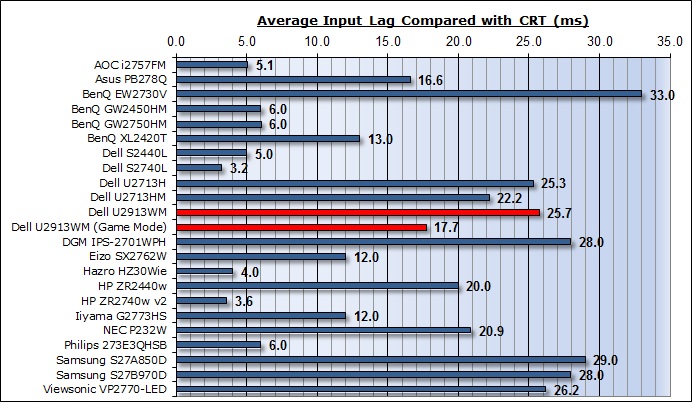
There are other problems too which make input lag more apparent regardless of refresh rate. For example, monitor it self has input lag on top of refresh rate.
If we take the XL2420T 3D 120 hz monitor as an example below(monitor I had), it has input lag of 13ms. So the maximum input lag it can have running at 120hz is 13ms + ((1 /120) *1000) = 21 ms
Dell S2740L for example only has 3.2 ms input lag so it actually has less lag than the 120hz BenQ. (3.2 +(1/60)*1000) = 19.8