By using this site, you agree to our Privacy Policy and our Terms of Use. Close

Forums - Microsoft - DigitalFoundry: Tech Analysis Gears of War 3 Multiplayer Beta

Here is another interesting piece.

The most immediately apparent upgrades concern motion blur, lighting and shadowing. As virtually all Unreal Engine 3 titles on console (bar the Mortal Kombat titles) have operated at the 30FPS level, motion blur is essential in giving a smoother look to the visuals. Camera-based motion blur in Gears 3 has been improved significantly over previous iterations, with a much better blending effect utilised.

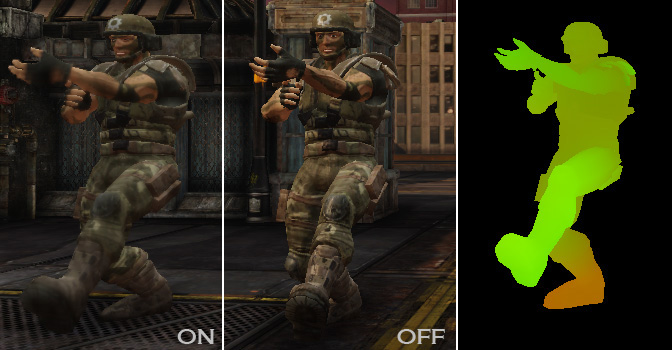
Also of note is the introduction of a really effective object-based motion blur. OBM has only been used sporadically in previous UE3 titles (such as Mass Effect 2) and even then in a very limited, barely noticeable manner. The quality of the effect seen in Gears 3 is more along the lines of that seen in Killzone 3 and God of War III, and represents a significant leap forward for Unreal Engine 3 - we even see individual levels of motion blur being employed on different parts of the main character's body: if one arm is moving faster than the other, that will be reflected in the amount of blur being applied. This is called "motion blur skinning" by Epic, and according to its own documentation, it is currently only utilised on Xbox 360 and PC, with possible performance implications for this style of implementation if it were added to the PS3 version of UE3.

The overall effect is impressive: the game may well operate on the same baseline frame-rate as its predecessors, but there's little doubt that to the human eye it looks significantly smoother.


Around the Network
Nsanity said:

DF seemed happy enough with it and still only the beta code.

In common with the vast majority of UE3 titles there's a native 720p resolution with no anti-aliasing. Gears 2 appeared to feature 2x multi-sampling anti-aliasing on some of its render passes, an effect that was then blitzed by later effects, giving a 0x AA effect with just a few smoothed-off edges remaining. In the new sequel it looks as though UE3 doesn't bother wasting GPU cycles on an effect that is mostly killed off by additional processing, and it's the right thing to do in freeing up Xenos resources for effects that do matter.

Despite the lack of any form of AA in the beta code, it has to be said that overall image quality in the beta is excellent, and jaggies are hardly an issue at all; this is mostly down to a combination of the artwork style lacking extreme contrast and also in the accomplished post-processing effects. Indeed, if anything we see an improvement over Gears 2 here - the majority of the older game's specular aliasing issues are all but gone.

I like that, the game has no AA,  but has the image quality of a 3-4xMSAA game


Ajescent said:

Why is it now the norm to analyse (sp) betas and things that are inconsequential? Why not wait for the final product?

Because it's the best chance we have of getting a preview of the technological upgrades. Just like people want to see what gameplay is like before the game is released, we have previews that show just that, even though things may change before the game releases. It's just another preview, but one with the technology at the forefront.


A more thorough analysis imo using the same tech DF use.

http://imagequalitymatters.blogspot.com/2011/05/tech-analysis-gears-of-war-3-beta.html


Badassbab said:

A more thorough analysis imo using the same tech DF use.

http://imagequalitymatters.blogspot.com/2011/05/tech-analysis-gears-of-war-3-beta.html


How long have they been around?


Around the Network
Nsanity said:
Badassbab said:

A more thorough analysis imo using the same tech DF use.

http://imagequalitymatters.blogspot.com/2011/05/tech-analysis-gears-of-war-3-beta.html


How long have they been around?

Going by there first tech analysis probably Jan 10.


More on Motion Blur Skinning

http://udn.epicgames.com/Three/MotionBlurSkinning.html


imagequalitymatters.blogspot.com/2011/05/tech-analysis-gears-of-war-3-beta.html