









Sqrl on 11 June 2009
Quick walkthrough for those who have asked:
Step 1: Find the person
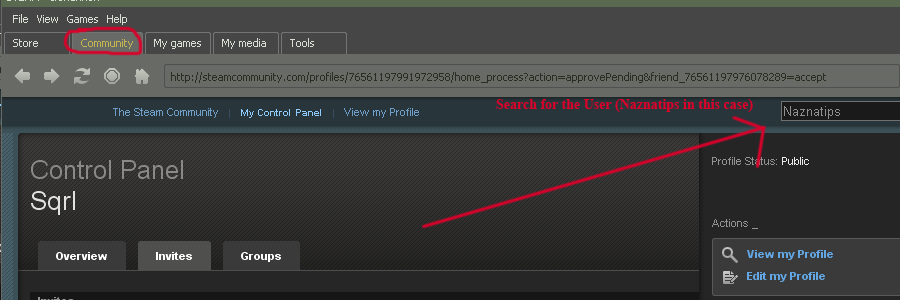
Go to the community tab of your steam client and enter the name of the user you wish to search for.
Step 2: Navigate to their profile

Now that you've found the person in the search click their name to go to their profile page.
Step 3: Add them to your friends list
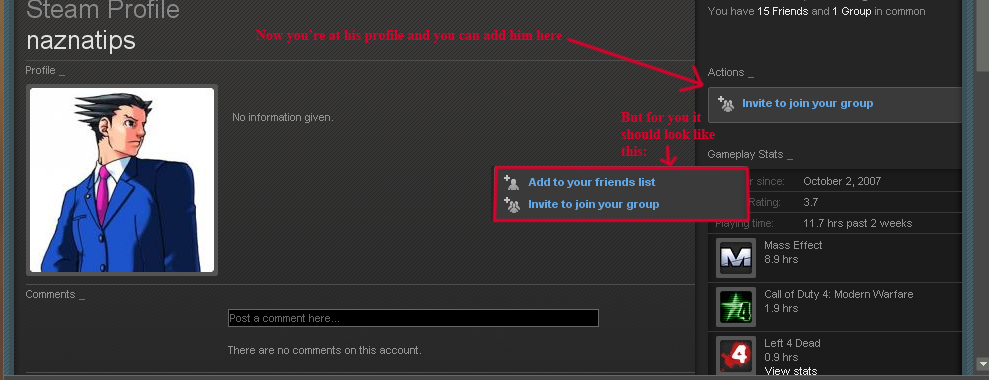
Add them to your friends list by clicking the link~ You should now be able to send them a message (not 100% sure, you might have to wait until they add you as well, report back in this thread plz)
 |
| To Each Man, Responsibility |


