By using this site, you agree to our Privacy Policy and our Terms of Use. Close

Forums - Sony - Advise about TV/Computer screen!

Hi!

Buying a PS3 this week or next week(prolly this week).

I don't have a TV in my room or room for a TV in my room for that matter, so I am thinking about playing the PS3 to a computer screen or a buying a little TV like 19-20 inch which I can use with both the computer/PS3.

Has anybody played the PS3 on a computer screen?, some advice , whats your thoughts?

Questions:

1. Does the TV have to be full HD for best picture?(have read that full HD/HD ready doesn't really matter if the TV isn't bigger than 40 inch).

2. Is there any diffrences using a TV or computer screen with the computer?

3. How do I get the sound from the PS3 if I go with the computer screen?

Thats all the questions I have for now, am pretty sure some more will pop up

Thx in advance


Around the Network

Yeah I have done it and it was worth it, I got a 24" 1080p monitor and it looked fine.
You just gotta make sure the monitor has a HDMI input so you can plug the PS3 into it.
The HDMI cable transfers both Audio and Video so if you have speakers plugged into your monitor then the audio will come out of it.


OK, you could have both the computer and the ps3 plugged in all the time, or did you have to switch alot of cables? 


Checked some prices up, seems a full HD computer screen is cheaper than a full HD TV by a 100 $.

But still the question remains: how do you get sound from the PS3 then, (the screen has an HDMI input if that helps)


When I did it I had to use the optical out and hook that up to my headphones, though I'm not sure if that will be what you want to do.

Also, for such a small screen, I don't think you need 1080p, you probably only need 720p.


Around the Network

if you want this as a computer screen you definitely want a full 1080p screen and dont believe the bs you definitely can tell the difference. whats your budget? for 269.99 you can get a 24 inch auria 1080p tv from newegg.com i have this for my ps3 and highly recomend it if thats too pricy there are many 20+ inch 1080p moniters under 200 made by acer and averatec


(sorry double post) as an afterthout while for a ps3 720p is fine as 99% of games are native 720p anyway as a computer screen its rather low resolution which is why i say a full 1080p screen is important.


Dioxinis said:
(sorry double post) as an afterthout while for a ps3 720p is fine as 99% of games are native 720p anyway as a computer screen its rather low resolution which is why i say a full 1080p screen is important.

Ah yes, I forgot to mention that I was talking about the PS3 only here.  PS3 games generally are 720p so there's no point in going 1080p for the games.

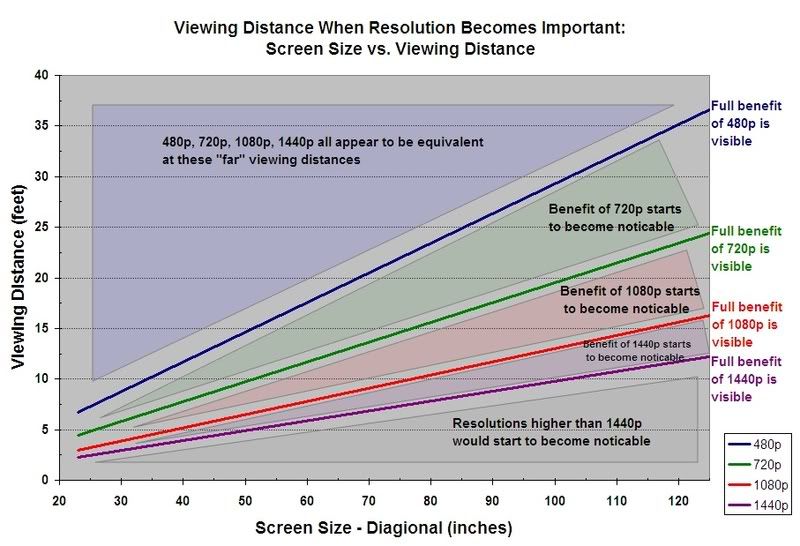
As for screen vs size, refer to this chart:

I know that graph tells you can notice 1080p when close on a small screen but there's a reason it's hard to find a 1080p smaller than 30"-- it really isn't worth the extra money you'll spend at that size.  If you're just playing PS3 games while watching the occassional movie while using it as a computer too, you don't need the 1080p.

As for the PC stuff, it depends on what your video card can handle, you'll mainly just want a monitor that can do 1900x1200 I believe assuming your video card can do that.


I think I am going for a 1080p 22-24 inch computer monitor , I found several around 200$

But how will I get sound from the ps3?, you mentioned something about it "twesterm", could you eleborate a little more?


you MUST get a Computerscreen with "HDCP", otherwise you will get a black screen when plugging the PS3 in.

And you have to get an external Sounddevice.

Sorround System, or whatever.


I'm a Foreigner, and as such, i am grateful for everyone pointing out any mistakes in my english posted above - only this way i'll be able to improve. thank you!