DOOD!!! u need to get Bushido Blade 2...... im my mind the greatest figting game of all time
Edit: sorry off topic but if ure a fight fan u gotta play it >_<
DOOD!!! u need to get Bushido Blade 2...... im my mind the greatest figting game of all time
Edit: sorry off topic but if ure a fight fan u gotta play it >_<
I've never been a big fan of fight sticks, I have trouble pulling off moves with them. D-Pad is what I generally like to use. I got the MadCatz Fight Pad for Street Fighter 4 and I love it.
I may mod in a d-pad just to give options, if I do build it.
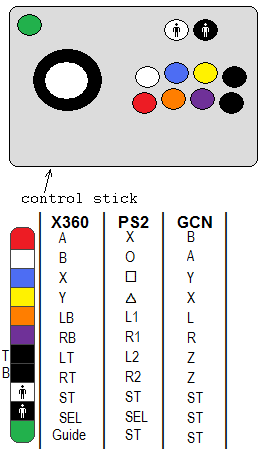
But, at the current point in time, here's my basic design:
SW-5120-1900-6153

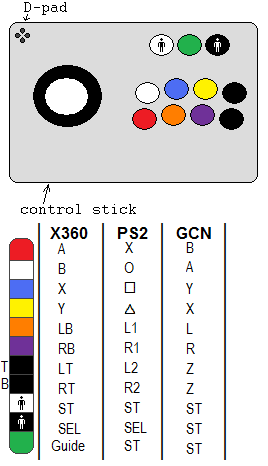
Edited model. After thinking about it, I've decided I probably will be modding in a D-pad.
SW-5120-1900-6153

So you want to play PS2, Wii, and Xbox360 games? Very ambitious =P ok if you're pro enough at soldering I would suggest you use a PS2 and Xbox360 PCB
http://slagcoin.com/joystick/pcb_wiring.html
read the bottom of that article it talks about multiple PCBs. Afterwards what you do is buy a Wii adapter like this one or any other if you can find it cheaper
http://www.consolesource.com/ecomm/catalog/Magic-Path-PS2-Controller-Adapter-For-Wii-p-2627.html
If you can afford it and don't want the headache of multiple PCBs you can use just the PS2 PCB and connect to 360 via a XFPS360 adapter but they go for around 60-80 dollars. At the same time a 360 PCB is around 40 dollars though, unless you have some broken controllers.
I've already done the research, found a number of sites that have the PCB wiring. Including the one you linked. That one is wonderful - it has a LOT of PCB wire schemes, though. I bookmarked it within thirty seconds of opening it up. =)
And actually, I'm probably going to be using all three - PS2, GCN, and 360 PCBs in it. If I buy controllers on eBay, I can get all three - a wired 360, a PS2, and a GCN (all brand-new) for less than $35.
Doing a PS2 controller is apparently ENORMOUSLY easy - rather than soldering to the various points on the PCB, you just insert the wires into the appropriate slots on the PCB's connector. LOVE IT.
I think I will house each PCB inside the box, but have them run to a connector attached to the outside (so, there'll be three female connectors on the outside). Then, the controller buttons themselves will be wired to a male connector that I can swap from each female as I please. This keeps each one separately wired - never crossing each other, and never worrying about having to have power to each one to keep it from frying. Kinda complicated, but it'll work better than anything else. I may have the actual connectors hidden behind a small door on the outside so I can keep the entire thing nice and aesthetic.
I also found these pages that are useful in building a custom arcade stick:
HarumaN's Xbox 360 Controller Hack Tutorial
X360 custom controller build (excludes LT & RT)
RDC's Complete Controller Wiring Hack (INCLUDES fairly simple instructions for LT/RT)
Project Gyokusho
SW-5120-1900-6153

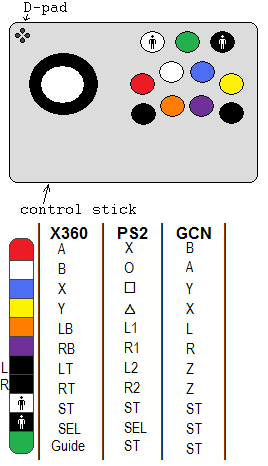
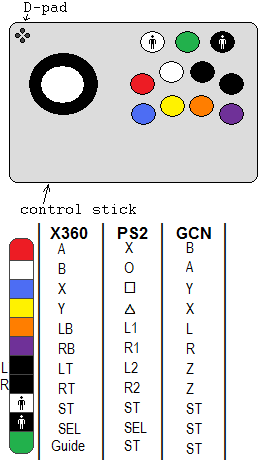
Anybody have thoughts on button placement? Which of the following do you think is best, and why? I've heard varying opinions on how the four main face buttons should be set up, and I'm curious what others think. I think I'm going to end up going with (something like) the last one, but I went through a bit of deliberation before making that decision.
Also, my design's undergone a couple minor changes regarding spacing. These spacing changes were to allow what I was talking about before. I'll post some scans of my concept drawings later.


SW-5120-1900-6153

Well done tonestarr you have done your research indeed =), that plan looks solid, I would choose it as well different voltages on electronics are too complex for me >
Oh, I didn't know the site had all those other pages too. I thought the top was just a banner or something, not links. Cool.
Although, that's not what I meant. That's just the template layout; I'm not concerned with that right now. I'm referring to which buttons are in which spots - all four face buttons on the top row; or one staggered to the bottom row; or maybe all four together with the four "shoulder" buttons next to it?
You see what I mean?
I'm just trying to get an idea for what to do. Not a big deal, though, since anything can be changed and it's never permanent.
SW-5120-1900-6153

Ahh now I understand what you mean, personally I would choose number 1, but I'm a big 2-D fighter fan and it seems you lean towards 3-D fighters more. I'm guessing L and R triggers are more important in the games you play?