Really I don't get, what does it mean? Some of my games are supposed to run in 1080p, others in 720p etc and I don't see the difference, what is it supposed to do???
1080P is a higher resolution than 720P. On bigger screens it is more noticable... IF the game is coded to it.
fox and abc are 720p
cbs and nbc are 1080i
1080p is only real on pc
consoles upscale
Repent or be destroyed
| richardhutnik said: 1080P is a higher resolution than 720P. On bigger screens it is more noticable... IF the game is coded to it. |
that's right , don't geet suckered in by the arguments on the (P)s' and (I)s', especially by the PS3 and 360 crowd.
cause unless u need 2 people to set up your HDTV(meaning 40 inches +), whether 720p, 1080i, or 1080p, it won't make much of a difference, especially if it'll cost a few extra hundred bucks.
my signature went on strike, it's demanding 3% raise
dnnc said:
that's right , don't geet suckered in by the arguments on the (P)s' and (I)s', especially by the PS3 and 360 crowd. cause unless u need 2 people to set up your HDTV(meaning 40 inches +), whether 720p, 1080i, or 1080p, it won't make much of a difference, especially if it'll cost a few extra hundred bucks. |
I remember when my friend opted for an 18" HD TV (I think) about the same time I got my 27" SD TV. I can't tell the difference in terms of image quality and my TV was no more expensive.
Resolution is a weird, weird subject. The differences between the lower-end resolutions (ie. 320x240 and 640x480) are quite noticeable at a glance by anybody, but for resolutions above 640x480, it's actually really hard to spot a difference unless you intentionally compare the two side-by-side or you've trained your eyes to spot the difference.
My computer's display is on a monitor which is set to 1920x1200, for example. But at a glance or at a distance, I don't really see any difference between that resolution and the 852x480 my Wii runs at on the exact same monitor. When I look closely, I can of course see the difference quite obviously, but otherwise, not really. I also cannot tell at a glance the difference between S-Video and component video, save that the colors are a bit more vibrant on component.
Sky Render - Sanity is for the weak.

1080p is nearly twice the HD of 720p,But no real games are native 1080p,once you see native 1080p you will know.
It's actually not that complicated. The number represents the total lines of resolution and the letter stands for either progressive or interlaced.
With interlaced you only ever actually have half of the lines of resolution showing at any one time....every other line to be exact, and then it flickers over to the lines it wasn't showing before, but it does it so fast that the human eye cannot detect it.
With progressive scan you have all of the lines of resolution on your screen at all times.
To sum it up, if you have a 1080p tv you are really getting 1080 lines of picture all the time, but with 1080i you are getting 540 lines at a time, but because both sets of 540 lines are interlacing so fast it looks like 1080.
Now one might think then that 720p is actually more hi-def than 1080i, and in some cases it's true, but not always. 1080i looks better than 720p for most things, but if you were to watch a video of a fast moving object, the object itself would look more crisp on a 720p. Interlaced video has slight blurring on the edges of fast moving objects.
Of course all of this means nothing if your tv is smaller than 40 inches because the human eye won't know the difference.

It is broken into two groups
1080 is the resolution. On a computer monitor that would be 1920x1080, making the 1080 the number of pixels from the bottom of the screen to the top of the screen.
The i on 1080i stands for interlaced. A good article on interlaced is here: http://en.wikipedia.org/wiki/Interlaced
If it is p as in 1080p, that if progressive. Progressive is desired over interlaced especially for LCD screens. Here is an article that describes it: http://en.wikipedia.org/wiki/Progressive_scan
720i/p and 480i/p are resolutions also. This chart details when the increase in resolution matter:
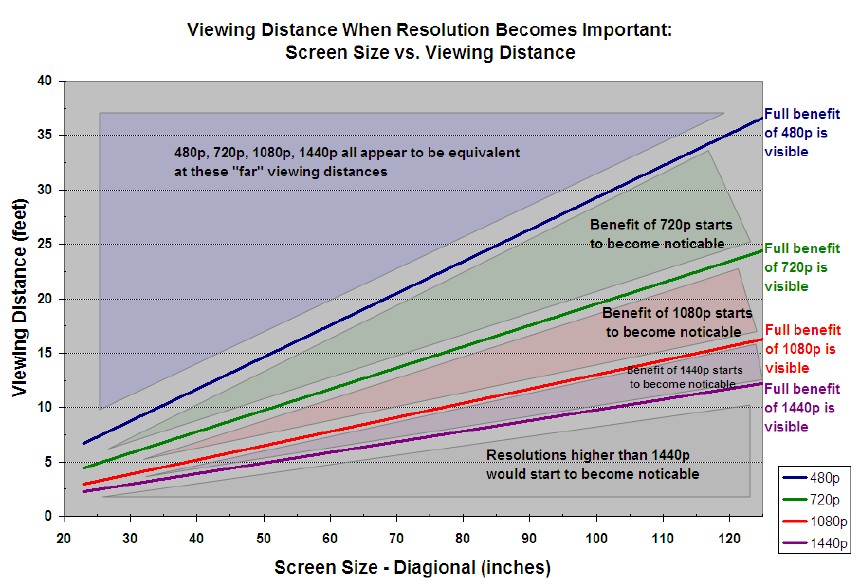
I have a relatively small LCDTV at 32". I would have to be closer than 10 feet to notice an increase from 480p to 720p.
Many games on XBOX360 and PS3 do not display at 1080p. This is because doing so would emphasize graphical imperfections and possibly slow down the framerate.