By using this site, you agree to our Privacy Policy and our Terms of Use. Close

Forums - PC - Help needed for new build.

@ sqrl

the mobo details state 2 PCI Express 2.0 x16 (SLI: full x16, x16 mode) so unless I'm missing something, which is entirely possible I think I should be good. As for the need for a bigger PSU, are you 100% sure? The OCZ one I've selected is an SLI edition so I thought I'd be covered, though again I could be mistaken.

I'll def look into Seagate HDDs.

In regards to value for money, I'm completely open to suggestions on alternatives which offer the same performance. The only part I can see which might seem a bit pricey is the mobo but it means that I'll be able to add another 9600gt in the future instead of laying out for another single high end card. I have a feeling that the high prices have more to do with them being UK parts than you think.

Anyway, I appreciate your continued advice.


Hus said:

Grow up and stop trolling.

Around the Network
Biggerboat said:
@ sqrl

the mobo details state 2 PCI Express 2.0 x16 (SLI: full x16, x16 mode) so unless I'm missing something, which is entirely possible I think I should be good. As for the need for a bigger PSU, are you 100% sure? The OCZ one I've selected is an SLI edition so I thought I'd be covered, though again I could be mistaken.

I'll def look into Seagate HDDs.

In regards to value for money, I'm completely open to suggestions on alternatives which offer the same performance. The only part I can see which might seem a bit pricey is the mobo but it means that I'll be able to add another 9600gt in the future instead of laying out for another single high end card. I have a feeling that the high prices have more to do with them being UK parts than you think.

Anyway, I appreciate your continued advice.

@Mobo: I think the chipset is the problem actually, Asus' site is a little vague in that it says the hardware is ready for x16/x16 but the chipset isn't from what I can find (note: this is a chipset review).

"When running in SLI mode, the 750i’s PEG slots operate in a dual x8 configuration"

There at least seems to be some confusion about what the board is capable of so we should double check to be sure before you spend money on it. If the board runs x16 on both slots in SLI its a great board, if not you may need to consider another one.

From what I understand about the way a motherboard works you could hook up this motherboard and it would report that it runs at x16 on both slots because the physical connections are there. But when you turn on SLI the North Bridge will not utilize the full hardware and instead will only use x8 on each slot because thats how it is designed. I could be off on this as I'm still just a student of this stuff (no degree yet), but that is my current take on it.

@PSU: I honestly haven't put 9600's in SLI and tested the power usage so I won't say I'm 100% certain. What I can tell you is that nVidia currently hasn't listed their recommended PSUs for 9600s in SLI but for the OCZ brand the weakest PSU recommended by them for 7800GTX, 7900GTX, 8800GTS, 8800GT, and 7950GX2 is the 700W.

With that said the 9600s are supposed to be a drop in power consumption so it is feasible that your current PSU will work. I personally have 8800GTs in SLI and use a 750W PSU, my tests show that the peak under load is around 278W and from the reviews it seems like the 9600 is around 248 at peak under load. These numbers vary a fair amount depending on what else you have in your system so it is a bit of a guessing game in that regard.

Based on what I've seen from the reviews the folks who have tested it are recommending 500W minimums which would mean 600W is probably safe. I personally would go with something 650W to be sure but I have no problem deferring to the folks who have actually tested it with hands-on.

@Cost,

You're not gonna save money without a performance hit or moving to a place Newegg ships to =P. The reason I am bringing up the price is because you've shown a concern about the rising cost of the PC. I have no problem helping you build an expensive PC but if money is an issue as you've mentioned several times I'm going to suggest you look at other options. You need to decide which way you want to go because I don't want you to buy something purely because I told you to (except perhaps the seagate drives). If you purchase something you should be happy with the purchase, plain and simple.

What I'm saying is if you want all of this hardware and features then thats fine but you need to be ok with their pricetag also. Every time you mention a concern for cost I think "Well if cost is an issue then you probably shouldn't spend this much on the CPU and the Monitor.". Again I'm just being honest here, not trying to be rude.




To Each Man, Responsibility

@ sqrl

Ok, after further investigation, I now share your suspicion of the 750i's 16x16 capability. The phrase 'Hardware ready for x16, x16' keeps on rearing it's head which to me suggests techno-babble aimed at confusing the customer.

As for the PSU, again after further investigation I've found conflicting views on whether 600W will be enough. MicroDirect are currently working on a quote for me and if they aren't willing to bump me up to the 700W version free of charge then I'm gonna have to go back to the drawing board.

This whole SLI thing is starting to irritate so unless I find some irrefutable evidence that the 750i does what it hints that it does I'm just gonna settle for the GA-P35-DS3L.

In regards to the price, I don't mind paying a little over my origional budget for a setup that will last me a good while. The CPU seems to be pretty damn good in terms of price/performance ratio and I need a goodish size monitor because I intend to do a lot of design work on it. Think of my budget as 750 pounds absolute maximum to clear up any confusion of what I'm willing to spend.

This pc building malarky isn't as easy as I thought it would be, I hope the building of the damn thing doesn't follow this trend!

Also, I'm curious, what do you do that requires you to own 11 320GB HDDs?


Hus said:

Grow up and stop trolling.

@Biggerboat

Here is something most people on this site will disagree with, but I will throw my 2 cents in.

If you buy your computer with one video card, and are happy with it, you will never buy a second. First off (unless something is new that I don't know about), you will have to buy the exact same one (XpertVision GeForce 8800 GT 512MB in your case). Second, the delta between what you have and what two videos cards provide in real gaming is small. Unless you are an extreme personality that freaks out as soon as you can't turn every on, by the time you get annoyed enough to make the investment, a better option will be out there (like a card that's the same price but as fast as two of yours with more features (DX 11 or something).


TheRealMafoo said:
@Biggerboat

Here is something most people on this site will disagree with, but I will throw my 2 cents in.

If you buy your computer with one video card, and are happy with it, you will never buy a second. First off (unless something is new that I don't know about), you will have to buy the exact same one (XpertVision GeForce 8800 GT 512MB in your case). Second, the delta between what you have and what two videos cards provide in real gaming is small. Unless you are an extreme personality that freaks out as soon as you can't turn every on, by the time you get annoyed enough to make the investment, a better option will be out there (like a card that's the same price but as fast as two of yours with more features (DX 11 or something).


I understand where you're coming from though I kinda disagree on the impotance of 2x the power. For instance if that wasn't a significant gulf then why not save myself a lot of dough and just settle for a 8600? The 9600gts are supposed to work very well in SLI, a step from pretty much any othe nvidia card out there, that's why I'm kind of sold on the idea. I'm also going to be doing some 3d stuff next year in college so want the option of beefing my setup up. I do share your concern that I could find it hard to track down another Xpertvision card and will give it some thought. I'm going to be running xp so the appearance of new DXs doesn't really figure in my reasoning.

It may be a moot point anyway, as if the mobo I'm looking at doesn't support 2x16 performance or I can't get bumped up to the 700w OCZ PSU for free then I'll be reverting to a single card setup. 


Hus said:

Grow up and stop trolling.

Around the Network
Biggerboat said:


Also, I'm curious, what do you do that requires you to own 11 320GB HDDs?


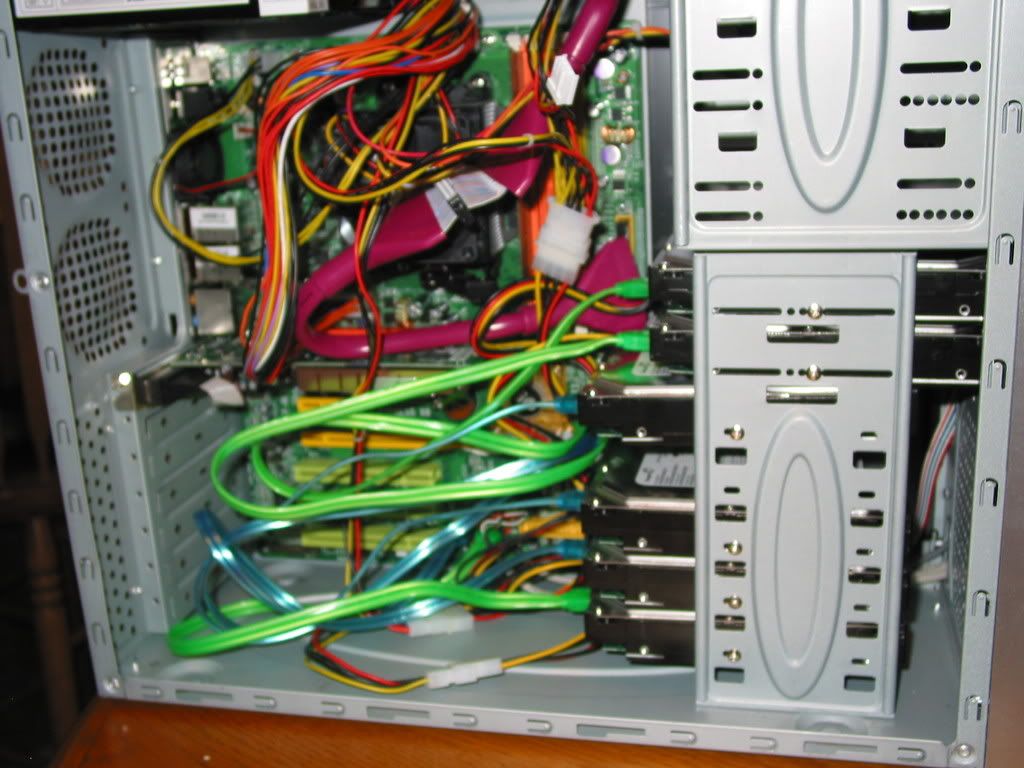
I have 2 in my gaming rig, 1 in my spare PC for guests etc.., 1 in my PS2 (added this after I was tired of failing PS2 lasers), 6 in my file server and 1 spare for the file server just in case a drive in the Raid fails so I can replace it right away. I actually also have a 1TB Seagate drive in my TiVo which is modded, I extract and store a lot of shows and movies (100% legal, timeshifting, thanks Sony!). In short, I'm a bit of storage whore ...so sue me.

This is a pic from the build, I added two fans later to help with cooling.

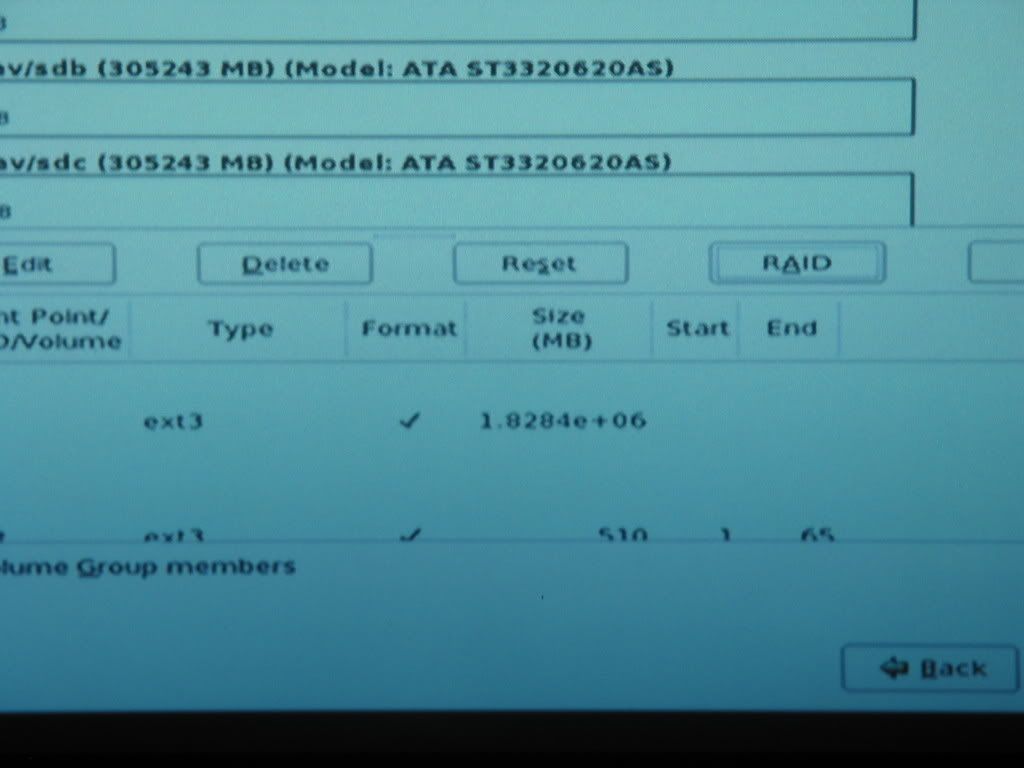
This is a shot from the installation:

Brings back good memories, I remember what was on TV when I built this rig...thats kinda weird now that I think about it...some people remember what they were doing when we landed on the moon. I remember what was on TV when I was building my file server (and took pictures!)=P

PS - It was back when the Iraq war was starting and it was the day all those Iraqis tied a rope around Saddam's statue and pulled it down and beat it with their shoes. Now that I think about those hard drives are close to being out of Warranty if they aren't already =P

PPS - Yes I'm a total geek no need to tell me, I'm proud of it =)

edit: My problem with hard drives is that an 80GB drive is like $42, 160Gb is around $52, 250Gb is like $64, 320GB is $80, 500GB is $105 etc..Basically the cost goes up in such small increments for such large increases that its hard to say no ><  

Again....I know I have issues =P 


To Each Man, Responsibility
Biggerboat said:
TheRealMafoo said:
@Biggerboat

Here is something most people on this site will disagree with, but I will throw my 2 cents in.

If you buy your computer with one video card, and are happy with it, you will never buy a second. First off (unless something is new that I don't know about), you will have to buy the exact same one (XpertVision GeForce 8800 GT 512MB in your case). Second, the delta between what you have and what two videos cards provide in real gaming is small. Unless you are an extreme personality that freaks out as soon as you can't turn every on, by the time you get annoyed enough to make the investment, a better option will be out there (like a card that's the same price but as fast as two of yours with more features (DX 11 or something).


I understand where you're coming from though I kinda disagree on the impotance of 2x the power. For instance if that wasn't a significant gulf then why not save myself a lot of dough and just settle for a 8600? The 9600gts are supposed to work very well in SLI, a step from pretty much any othe nvidia card out there, that's why I'm kind of sold on the idea. I'm also going to be doing some 3d stuff next year in college so want the option of beefing my setup up. I do share your concern that I could find it hard to track down another Xpertvision card and will give it some thought. I'm going to be running xp so the appearance of new DXs doesn't really figure in my reasoning.

It may be a moot point anyway, as if the mobo I'm looking at doesn't support 2x16 performance or I can't get bumped up to the 700w OCZ PSU for free then I'll be reverting to a single card setup.


You don't need the exact same card actually. You need the same chipsets and thats pretty much it. Outside of that the hardware will automatically lower the clock speed of all hardware assets so that the faster one lowers to the slower one. Even different RAM will just restrict one of the cards to make them identical. Generally speaking this means tha you can run two 9600s in SLI regardless of manufacturer, ram, or factory OC etc. When you pick out your second card if you can't find the exact same card you can just check online for compatability to be sure, the SLI forums on nVidia's site is a great place to sign up and ask SLI related questions if you have them.

Personally I love my SLI setup, but I wouldn't recommend it for everyone. It comes with a lot of hassles and while I enjoy the challenges of solving the problem and learning something new about my PC I suspect that most people do not. On the plus side with the nice monitor you are getting you can take advantage of SLI, most folks don't seem to understand that SLI is most beneficial when used at higher resolutions or with high AA (and/or both).


PS -@Biggerboat,

Oh and I actually agree about the processor, its a damn nice processor and the price really isn't that bad overall. Its probably the best Intel CPU available right now in terms of bang for buck....and it definitley has some bang.


To Each Man, Responsibility
Biggerboat said:
TheRealMafoo said:
@Biggerboat

Here is something most people on this site will disagree with, but I will throw my 2 cents in.

If you buy your computer with one video card, and are happy with it, you will never buy a second. First off (unless something is new that I don't know about), you will have to buy the exact same one (XpertVision GeForce 8800 GT 512MB in your case). Second, the delta between what you have and what two videos cards provide in real gaming is small. Unless you are an extreme personality that freaks out as soon as you can't turn every on, by the time you get annoyed enough to make the investment, a better option will be out there (like a card that's the same price but as fast as two of yours with more features (DX 11 or something).


I understand where you're coming from though I kinda disagree on the impotance of 2x the power. For instance if that wasn't a significant gulf then why not save myself a lot of dough and just settle for a 8600? The 9600gts are supposed to work very well in SLI, a step from pretty much any othe nvidia card out there, that's why I'm kind of sold on the idea. I'm also going to be doing some 3d stuff next year in college so want the option of beefing my setup up. I do share your concern that I could find it hard to track down another Xpertvision card and will give it some thought. I'm going to be running xp so the appearance of new DXs doesn't really figure in my reasoning.

It may be a moot point anyway, as if the mobo I'm looking at doesn't support 2x16 performance or I can't get bumped up to the 700w OCZ PSU for free then I'll be reverting to a single card setup. 


That's why I prefaced it with "If you buy your computer with one video card, and are happy with it". I did what you are doing twice. Setup my PC so I could slap another video card in it when I was ready for SLI fun. The problem is, in real world scenarios, once you have that setup; you end up being happy with the performance for a long time. Yes, games will play better with two cards, but it will look great with one, and when you say to yourself “Do I want to spend $300 for a few frames per seconds, or a few extra settings?” I always found other ways to spend that money to better my Rig.

It only cost you a little more to position yourself for the upgrade, so I am not trying to encourage you not to, I am just saying that there is a good chance that you won’t end up doing it.

Gaming rigs are hobbies to a lot of people who run SLI. Having SLI is the fun (like Sqrl). It’s cool to run benchmarks and see how quick your system is, but when it comes to real world practicality, one card usually does the trick. What causes me to upgrade most of the time, is when cards add features, so visual effects that otherwise have no possibility to be seen on your current GPU are implemented in games, I look for a new card.


@ sqrl

I have actually signed up for a slizone account regarding the mobo specs(I'd link it but the forum is undergoing an update), unfortunately nobody so far has given me a definative answer but I was advised to use nvidia's specs as a good basis for my decision. Nvidia lists the 750i as only having 1 x16 PCIe port but an experienced member of the forum told me that no current GPU even takes full adavntage of a x8 port so x16x16 shouldn't figure too heavily in my decision.

To summarize I'm still very much on the fence. You mention SLI being quite problematic, is that because you're messing with the setting & tweaking things or is that the case even when just wanting to run them on default settings? I ask because this is my first system build and I don't want to make it too arduous a project!

@ Mafoo

I see what you're saying though I don't expect to get the 2nd 9600 for a while, like a year or so, at which point it should be bargain basement prices so I won't have the dilemma of parting with $$$$s.


EDIT: Oh, and sqrl, I imagine that most houes don't have that much wiring, pretty insane setup;)

EDIT2: the slizone forum is back up, here's the thread if you are interested. 


Hus said:

Grow up and stop trolling.

Biggerboat said:


@ Mafoo

I see what you're saying though I don't expect to get the 2nd 9600 for a while, like a year or so, at which point it should be bargain basement prices so I won't have the dilemma of parting with $$$$s.


To give you an example, my card is dated now. I have a EVGA 7800 GTX (I paid $500 for it when it came out). The card today cost $220. For $240, I can buy an 8800 GTS that is on par with two of my video cards, does DX10, and I have the option to SLI that one for further expansion.

Thus, the cycle continues :)