
By using this site, you agree to our Privacy Policy and our Terms of Use. Close

Forums - Sony - Sony issues guidelines to fix "Blue light error"

As posted earlier here . The guidelines are pretty thorough. I hope they make a lot of people happier.

Here are some of the symptoms associated with blinking blue lights issue:

  • blue indicator light blinking
  • no video/audio output to television
  • console powering off after blinking blue

 This blinking light issue could indicate any number of causes including but not limited to:

  1. TV compatibility
  2. Issues with PS4 power supply
  3. Issues with PS4 hard drive
  4. Issues with other PS4 hardware


TV Compatibility Troubleshooting: 

  1. Some users have indicated that updating the firmware on their televisions has resolved some cases of no audio/video being displayed.


Power Supply Troubleshooting:


1) Turn PS4 off completely 

  • Touch the power button on the front of the PS4 for at least 7 seconds (until the system beeps twice).


2) Disconnect PS4 AC power cord from electrical outlet

  • Only disconnect the plug of the AC power cord from the electrical outlet when the power indicator is turned off. If you disconnect it while the power indicator is lit or blinking, data might be lost or corrupted, and the system might be damaged.


3)  Check parts A, E, and F for any conspicuous damage or anomalies 

  • You can try using another compatible AC cord (like a power cord from a PS3) to see if that resolves the issue
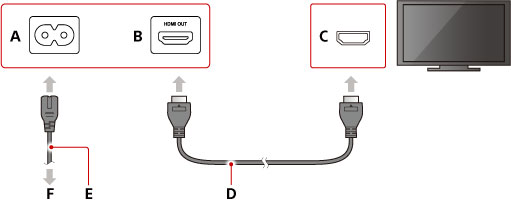


A) AC IN connector

B )HDMI OUT port

C )HDMI input port

D )HDMI cable

E )AC power cord

F )To an electric outlet


Hard Drive Troubleshooting 


1) Turn PS4 off completely

  • Touch the power button on the front of the PS4 for at least 7 seconds (until the system beeps twice).

2) Disconnect PS4 AC power cord from electrical outlet

  • Only disconnect the plug of the AC power cord from the electrical outlet when the power indicator is turned off. If you disconnect it while the power indicator is lit or blinking, data might be lost or corrupted, and the system might be damaged.

3) After removing the plug for AC power cord from the electrical outlet, detach the other cables from the PS4.


4) Slide the HDD bay cover in the direction of the arrow to remove it.


5) Inspect the harddrive to make sure it is properly seated in the HDD bay.  A loose hard drive connection can prevent the PS4 from powering on completely.  A single screw keeps the assembly in place as shown below.


6)  If you suspect possible hard drive damage or would simply like to replace the PS4's hard drive with one of your choosing, please refer to this article for full details

https://support.us.playstation.com/app/answers/detail/a_id/5107

  •  Users can choose to install a new hard drive so long as it complies with these standards, it is no thicker than 9.5mm, and is larger than 160GB.


Software Installation Troubleshooting;


1) If your hard drive and power supply appear in good shape, you can try to booting your PS4 into Safe Modehttps://support.us.playstation.com/app/answers/detail/a_id/5044

  • The following options are available in Safe Mode:
  1. Restart System - Ends Safe Mode and restarts the PlayStation 4 normally.
  2. Change Resolution - Changes the screen resolution to 480p when the PlayStation 4 is restarted.
  3. Update System Software - Allows the PlayStation 4 to update the system software via Internet, USB Drive, or Disc.
  4. Restore Default Settings - Restores the PlayStation 4 to the default factory settings.
  5. Rebuild Database - Scans the drive and creates a new database of all content.This operation may take a long time depending on the type and number of data items.
  6. Initialize PS4 - IMPORTANT: All data and settings will be lost by performing this step. Deletes all user data and restores the PS4 to as if it just came out of the box. This option is the same as [Initialize PS4 ] in the (Settings) menu. System software (firmware) is not deleted.
  7. Initialize PS4 (Reinstall System Software) - IMPORTANT: Deletes all information on the HDD, including the System Software. A message that states a USB storage device containing the System Software must be connected, is displayed. Then you can confirm the selection. (You will need the full system update installer from http://us.playstation.com/support/systemupdates/ps4/pc_update/index.htm with this option)


For additional service/replacement options please try contacting support: 

https://support.us.playstation.com/app/contact_options

Due to the volume of contacts, we would suggest trying Live Chat rather than the phone line as the wait times will be shorter.


If you would like to assist us by submitting information, please share the following:

  • Issue Symptoms:
  • TV Brand and Model:
  • Retailer PS4 was purchased from:
  • Troubleshooting steps you have tried:


This, I stole from grandpa...It's called soap.

Around the Network

Sorry for the blue background. I don't know how to change it.


This, I stole from grandpa...It's called soap.

As posted earlier here . The guidelines are pretty thorough. I hope they make a lot of people happier.

Here are some of the symptoms associated with blinking blue lights issue:

blue indicator light blinking

no video/audio output to television

console powering off after blinking blue

 This blinking light issue could indicate any number of causes including but not limited to:

TV compatibility

Issues with PS4 power supply

Issues with PS4 hard drive

Issues with other PS4 hardware


TV Compatibility Troubleshooting: 

Some users have indicated that updating the firmware on their televisions has resolved some cases of no audio/video being displayed.


Power Supply Troubleshooting:


1) Turn PS4 off completely 

Touch the power button on the front of the PS4 for at least 7 seconds (until the system beeps twice).


2) Disconnect PS4 AC power cord from electrical outlet

Only disconnect the plug of the AC power cord from the electrical outlet when the power indicator is turned off. If you disconnect it while the power indicator is lit or blinking, data might be lost or corrupted, and the system might be damaged.


3)  Check parts A, E, and F for any conspicuous damage or anomalies 

You can try using another compatible AC cord (like a power cord from a PS3) to see if that resolves the issue


A) AC IN connector

B )HDMI OUT port

C )HDMI input port

D )HDMI cable

E )AC power cord

F )To an electric outlet


Hard Drive Troubleshooting 


1) Turn PS4 off completely

Touch the power button on the front of the PS4 for at least 7 seconds (until the system beeps twice).

2) Disconnect PS4 AC power cord from electrical outlet

Only disconnect the plug of the AC power cord from the electrical outlet when the power indicator is turned off. If you disconnect it while the power indicator is lit or blinking, data might be lost or corrupted, and the system might be damaged.

3) After removing the plug for AC power cord from the electrical outlet, detach the other cables from the PS4.


4) Slide the HDD bay cover in the direction of the arrow to remove it.


5) Inspect the harddrive to make sure it is properly seated in the HDD bay.  A loose hard drive connection can prevent the PS4 from powering on completely.  A single screw keeps the assembly in place as shown below.


6)  If you suspect possible hard drive damage or would simply like to replace the PS4's hard drive with one of your choosing, please refer to this article for full details

https://support.us.playstation.com/app/answers/detail/a_id/5107

 Users can choose to install a new hard drive so long as it complies with these standards, it is no thicker than 9.5mm, and is larger than 160GB.


Software Installation Troubleshooting;


1) If your hard drive and power supply appear in good shape, you can try to booting your PS4 into Safe Modehttps://support.us.playstation.com/app/answers/detail/a_id/5044

The following options are available in Safe Mode:

Restart System - Ends Safe Mode and restarts the PlayStation 4 normally.

Change Resolution - Changes the screen resolution to 480p when the PlayStation 4 is restarted.

Update System Software - Allows the PlayStation 4 to update the system software via Internet, USB Drive, or Disc.

Restore Default Settings - Restores the PlayStation 4 to the default factory settings.

Rebuild Database - Scans the drive and creates a new database of all content.This operation may take a long time depending on the type and number of data items.

Initialize PS4 - IMPORTANT: All data and settings will be lost by performing this step. Deletes all user data and restores the PS4 to as if it just came out of the box. This option is the same as [Initialize PS4 ] in the (Settings) menu. System software (firmware) is not deleted.

Initialize PS4 (Reinstall System Software) - IMPORTANT: Deletes all information on the HDD, including the System Software. A message that states a USB storage device containing the System Software must be connected, is displayed. Then you can confirm the selection. (You will need the full system update installer from http://us.playstation.com/support/systemupdates/ps4/pc_update/index.htm with this option)


For additional service/replacement options please try contacting support: 

https://support.us.playstation.com/app/contact_options

Due to the volume of contacts, we would suggest trying Live Chat rather than the phone line as the wait times will be shorter.


If you would like to assist us by submitting information, please share the following:

Issue Symptoms:

TV Brand and Model:

Retailer PS4 was purchased from:

Troubleshooting steps you have tried:


Hope the European KZ Bundle PS4s don't have this issue.


Thanks BananaKING! I just wanted to keep the pictures too. I thought they would be helpful.


This, I stole from grandpa...It's called soap.

Around the Network

Important info is that neither Amazon nor Sony will replace your unit but at least Amazon might refund it and Sony repair it (source: a verified purchaser):

http://www.amazon.com/review/R3UNMU9YXOXOEI/ref=cm_cr_pr_viewpnt#R3UNMU9YXOXOEI

"[...] I excitedly opened my brand spanking new Playstation 4 only to be treated with the Pulsing Blue Light of Death. I tested the unit with multiple HDMI cables, 3 different TVs (Panasonic Plamsa 42", Sony LCD 40", Insignia LED 32") and even a receiver (brand new Denon receiver). I tried swapping the stock hard drive with the brand new Seagate Momentus 1TB Hybrid HDD I bought off of here just for the PS4. I even tried booting without a HDD in hopes to force a safe mode boot. I tried safe mode booting with the stock HDD and with my upgraded HDD. All that, and it is still the most expensive paperweight/brick I have ever purchased.

Afterwards I contacted Amazon customer support via chat and they told me the only thing they are willing to do is give me a full refund. No offer to replace it; not even when they received stock. So I called Sony, waited a grand total of FIVE (5) HOURS on hold; I was disconnected once after the first hour and a second time after the second hour; also I attempted using their chat system that even their phone system and website recommends only to be PURPOSEFULLY disconnected from the chat queue because Sony clearly wants to ignore this issue. When I finally got someone on the phone the only resolution I was given was repair.

Repair will take between 3-4 weeks and that's after they ship me the box to have my unit sent to Texas (their main repair center in the USA) for the repair. I was told I would receive an e-mail in regards to this. I never received the e-mail. Their phone systems are still so clogged up, it's not worth the hassle to call back yet to find out if the service order # for my repair is even worth anything.

This is the second console launch that I received a dead on arrival unit. The first was the Nintendo Wii. I had one of the infamous units with the bad C-MOS error that wouldn't allow you to connect to any wifi network. The difference? I called Nintendo, waited maybe 15 minutes on the phone, and they SHIPPED ME A BRAND NEW ONE and asked me to send the old one back in the same box with a pre-printed shipping label in it. Now, I don't know if you remember, but you couldn't find a Nintendo Wii for about a YEAR. They were so in demand it was ridiculous. This system has barely had time to breath and Sony can't afford to ship people out replacement units? That my friends, is an outrage.

I have been pretty brand loyal to Sony over my almost 30 years on this planet. This launch and the way they are treating their customers has made me lose a lot of faith in their company."


fighter said:

Important info is that neither Amazon nor Sony will replace your unit but at least Amazon might refund it and Sony repair it (source: a verified purchaser):

http://www.amazon.com/review/R3UNMU9YXOXOEI/ref=cm_cr_pr_viewpnt#R3UNMU9YXOXOEI

"[...] I excitedly opened my brand spanking new Playstation 4 only to be treated with the Pulsing Blue Light of Death. I tested the unit with multiple HDMI cables, 3 different TVs (Panasonic Plamsa 42", Sony LCD 40", Insignia LED 32") and even a receiver (brand new Denon receiver). I tried swapping the stock hard drive with the brand new Seagate Momentus 1TB Hybrid HDD I bought off of here just for the PS4. I even tried booting without a HDD in hopes to force a safe mode boot. I tried safe mode booting with the stock HDD and with my upgraded HDD. All that, and it is still the most expensive paperweight/brick I have ever purchased.

Afterwards I contacted Amazon customer support via chat and they told me the only thing they are willing to do is give me a full refund. No offer to replace it; not even when they received stock. So I called Sony, waited a grand total of FIVE (5) HOURS on hold; I was disconnected once after the first hour and a second time after the second hour; also I attempted using their chat system that even their phone system and website recommends only to be PURPOSEFULLY disconnected from the chat queue because Sony clearly wants to ignore this issue. When I finally got someone on the phone the only resolution I was given was repair.

Repair will take between 3-4 weeks and that's after they ship me the box to have my unit sent to Texas (their main repair center in the USA) for the repair. I was told I would receive an e-mail in regards to this. I never received the e-mail. Their phone systems are still so clogged up, it's not worth the hassle to call back yet to find out if the service order # for my repair is even worth anything.

This is the second console launch that I received a dead on arrival unit. The first was the Nintendo Wii. I had one of the infamous units with the bad C-MOS error that wouldn't allow you to connect to any wifi network. The difference? I called Nintendo, waited maybe 15 minutes on the phone, and they SHIPPED ME A BRAND NEW ONE and asked me to send the old one back in the same box with a pre-printed shipping label in it. Now, I don't know if you remember, but you couldn't find a Nintendo Wii for about a YEAR. They were so in demand it was ridiculous. This system has barely had time to breath and Sony can't afford to ship people out replacement units? That my friends, is an outrage.

I have been pretty brand loyal to Sony over my almost 30 years on this planet. This launch and the way they are treating their customers has made me lose a lot of faith in their company."

Is this relevant to the topic?


This, I stole from grandpa...It's called soap.

kabamarutr said:
fighter said:

Important info is that neither Amazon nor Sony will replace your unit but at least Amazon might refund it and Sony repair it (source: a verified purchaser):

http://www.amazon.com/review/R3UNMU9YXOXOEI/ref=cm_cr_pr_viewpnt#R3UNMU9YXOXOEI

"[...] I excitedly opened my brand spanking new Playstation 4 only to be treated with the Pulsing Blue Light of Death. I tested the unit with multiple HDMI cables, 3 different TVs (Panasonic Plamsa 42", Sony LCD 40", Insignia LED 32") and even a receiver (brand new Denon receiver). I tried swapping the stock hard drive with the brand new Seagate Momentus 1TB Hybrid HDD I bought off of here just for the PS4. I even tried booting without a HDD in hopes to force a safe mode boot. I tried safe mode booting with the stock HDD and with my upgraded HDD. All that, and it is still the most expensive paperweight/brick I have ever purchased.

Afterwards I contacted Amazon customer support via chat and they told me the only thing they are willing to do is give me a full refund. No offer to replace it; not even when they received stock. So I called Sony, waited a grand total of FIVE (5) HOURS on hold; I was disconnected once after the first hour and a second time after the second hour; also I attempted using their chat system that even their phone system and website recommends only to be PURPOSEFULLY disconnected from the chat queue because Sony clearly wants to ignore this issue. When I finally got someone on the phone the only resolution I was given was repair.

Repair will take between 3-4 weeks and that's after they ship me the box to have my unit sent to Texas (their main repair center in the USA) for the repair. I was told I would receive an e-mail in regards to this. I never received the e-mail. Their phone systems are still so clogged up, it's not worth the hassle to call back yet to find out if the service order # for my repair is even worth anything.

This is the second console launch that I received a dead on arrival unit. The first was the Nintendo Wii. I had one of the infamous units with the bad C-MOS error that wouldn't allow you to connect to any wifi network. The difference? I called Nintendo, waited maybe 15 minutes on the phone, and they SHIPPED ME A BRAND NEW ONE and asked me to send the old one back in the same box with a pre-printed shipping label in it. Now, I don't know if you remember, but you couldn't find a Nintendo Wii for about a YEAR. They were so in demand it was ridiculous. This system has barely had time to breath and Sony can't afford to ship people out replacement units? That my friends, is an outrage.

I have been pretty brand loyal to Sony over my almost 30 years on this planet. This launch and the way they are treating their customers has made me lose a lot of faith in their company."

Is this relevant to the topic?


If troubleshooting fails yes. Is that a problem ?


fighter said:
kabamarutr said:
fighter said:

Important info is that neither Amazon nor Sony will replace your unit but at least Amazon might refund it and Sony repair it (source: a verified purchaser):

http://www.amazon.com/review/R3UNMU9YXOXOEI/ref=cm_cr_pr_viewpnt#R3UNMU9YXOXOEI

"[...] I excitedly opened my brand spanking new Playstation 4 only to be treated with the Pulsing Blue Light of Death. I tested the unit with multiple HDMI cables, 3 different TVs (Panasonic Plamsa 42", Sony LCD 40", Insignia LED 32") and even a receiver (brand new Denon receiver). I tried swapping the stock hard drive with the brand new Seagate Momentus 1TB Hybrid HDD I bought off of here just for the PS4. I even tried booting without a HDD in hopes to force a safe mode boot. I tried safe mode booting with the stock HDD and with my upgraded HDD. All that, and it is still the most expensive paperweight/brick I have ever purchased.

Afterwards I contacted Amazon customer support via chat and they told me the only thing they are willing to do is give me a full refund. No offer to replace it; not even when they received stock. So I called Sony, waited a grand total of FIVE (5) HOURS on hold; I was disconnected once after the first hour and a second time after the second hour; also I attempted using their chat system that even their phone system and website recommends only to be PURPOSEFULLY disconnected from the chat queue because Sony clearly wants to ignore this issue. When I finally got someone on the phone the only resolution I was given was repair.

Repair will take between 3-4 weeks and that's after they ship me the box to have my unit sent to Texas (their main repair center in the USA) for the repair. I was told I would receive an e-mail in regards to this. I never received the e-mail. Their phone systems are still so clogged up, it's not worth the hassle to call back yet to find out if the service order # for my repair is even worth anything.

This is the second console launch that I received a dead on arrival unit. The first was the Nintendo Wii. I had one of the infamous units with the bad C-MOS error that wouldn't allow you to connect to any wifi network. The difference? I called Nintendo, waited maybe 15 minutes on the phone, and they SHIPPED ME A BRAND NEW ONE and asked me to send the old one back in the same box with a pre-printed shipping label in it. Now, I don't know if you remember, but you couldn't find a Nintendo Wii for about a YEAR. They were so in demand it was ridiculous. This system has barely had time to breath and Sony can't afford to ship people out replacement units? That my friends, is an outrage.

I have been pretty brand loyal to Sony over my almost 30 years on this planet. This launch and the way they are treating their customers has made me lose a lot of faith in their company."

Is this relevant to the topic?


If troubleshooting fails yes. Is that a problem ?

I think it's more suited to the actual error thread. These here are guidelines to help people fix the blue light issue. There is also a link at the end, should people need further assistance. The purpose here is to help people overcome the misfortune, not turn it into another battlefield.


This, I stole from grandpa...It's called soap.

kabamarutr said:
fighter said:
kabamarutr said:

Is this relevant to the topic?


If troubleshooting fails yes. Is that a problem ?

I think it's more suited to the actual error thread. These here are guidelines to help people fix the blue light issue. There is also a link at the end, should people need further assistance. The purpose here is to help people overcome the misfortune, not turn it into another battlefield.

If it's off-topic I'll let mods decide. I find your reaction very odd.